What is the price of Bizagi Modeler?
Bizagi Modeler desktop application is available at no cost as a free download. It is not a trial version or community edition, all the basic features are available for free.
Bizagi Modeler is also part of a Bundle in Bizagi Automation with enterprise capabilities. https://help.bizagi.com/platform/en/ms_plans.htm
Is Bizagi Modeler open source?
No, Bizagi Modeler is a freeware, but not open source. We do not have a developer version.
Bizagi Modeler is also part of a Bundle in Bizagi Automation with enterprise features. https://help.bizagi.com/platform/en/ms_plans.htm
How do I install Bizagi Modeler on my Mac?
Mac OS is not currently supported. However, you can execute Bizagi Modeler desktop application through a Virtual Machine.
Install the virtual machine of your preference (we recommend VMware) and then install and use Bizagi Modeler from the virtual machine.
You can also use a remote server to install Bizagi Modeler so different users could work on it at the same time.
Can I install Bizagi Modeler on a multi-user setup?
Bizagi Modeler can be installed in a remote Server (as per the requisites) to be accessed by multiple users.
What kind of files does the Modeler handle?
When you save a model,. Bizagi Modeler creates a .bpm extension file.
The .bpm in the 1.6 version is used to save a model that will be imported to our Bizagi BPM Suite to be automated and turned into a running application (workflow).
If you want to have interoperability (import, export) with other BPM tools, then you should use the standard XPDL language or Microsoft Visio.
For more information please refer to Exporting and Importing.
What is the BPMN version supported by Bizagi Modeler?
Bizagi Modeler supports the current version, BPMN 2.0.
For more information about BPMN 2.0, see http://www.omg.org/spec/BPMN/2.0
How do I know if my diagram has modeling errors?
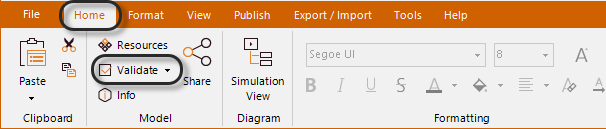
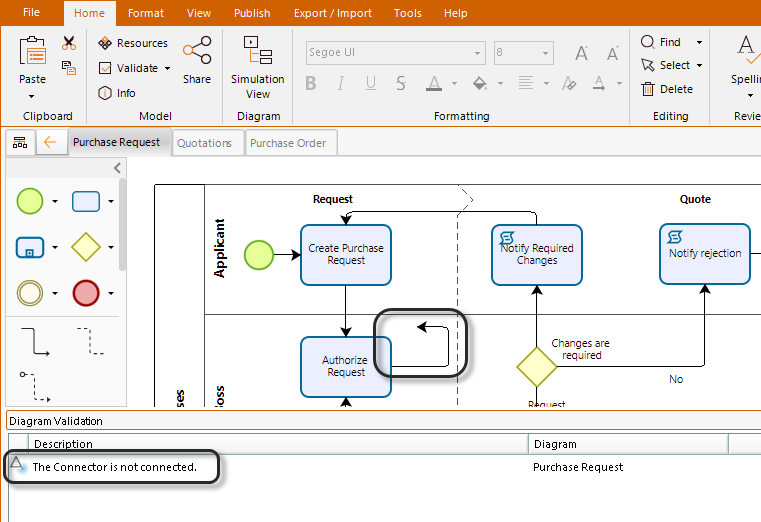
Bizagi includes a button that validates the element's location. and connections. On the Home tab, in the Model group, click on Validate to start error checking.
Select the error description in the Diagram Validation add-on window to correct it.
Bizagi Modeler does not validate the notation and the logic used in your diagram. However we offer several types of support to help you through your process modeling and documentation. For more information please refer to Training and Support.
I have multiple users in my organization that wish to collaborate on process models with me, how can Bizagi Modeler help me?
When you purchase Bizagi Automation, Modeler is included in the bundle. https://help.bizagi.com/platform/en/ms_plans.htm
This subscription give all the users access to edit or comment processes, give and receive feedback, review the history version of a process, among other features.
Once you acquire a subscription, you can invite your colleagues to collaborate with you through the desktop application of Bizagi Modeler or the Process Library.
What happens to my models when I am invited to a Enterprise subscription?
When you are invited to an Enterprise subscription, your models will become part of it. Likewise, bear in mind that user accounts on Enterprise environments are not connected to the accounts on the multitenant environment. If you are removed from an Enterprise subscription, your account there is deactivated, and your models will remain in the system, only the users that were previously added to the model will have access to them.
What devices can I use Bizagi Modeler on?
Any device running on Windows or within a browser. Make sure you review our System requirements.
Follow the link for our desktop application and cloud services requirements.
Where can I go to get support?
If your query is technical, you may find your answer in the Bizagi Modeler user guides.
If you purchase a subscription, you have access to Bizagi support and will be able to raise a support ticket. The following link shows you how to use the support site.
Last Updated 2/4/2026 9:48:07 AM