Overview
This process encompasses all the steps required to issue a new car insurance policy. It involves evaluating the vehicle, providing an insurance quote, assessing viability and risks, conducting an inspection, and, finally, issuing the policy.
To install this accelerator in your project, follow the steps outlined in the Process Xchange article.
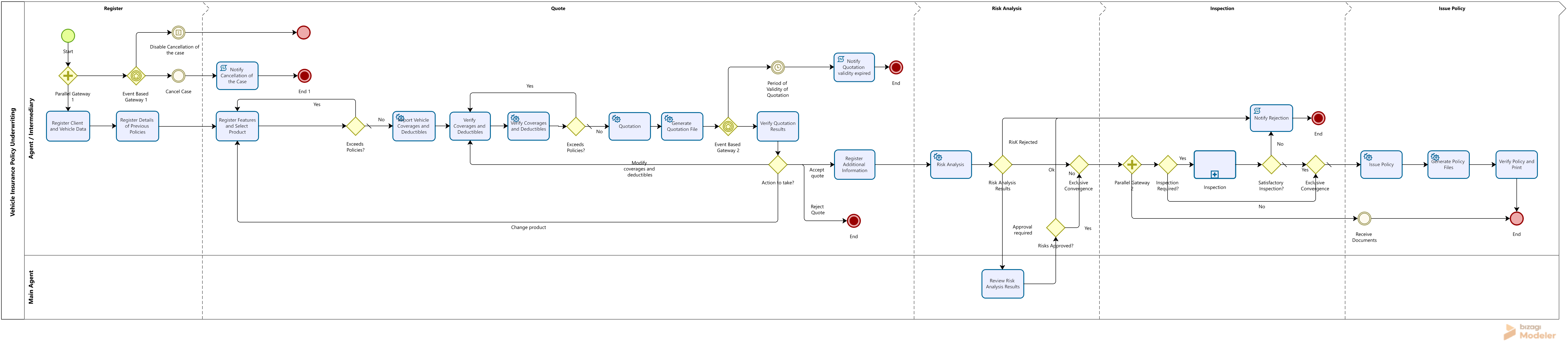
Bizagi Modeler Process Description (BPM)
The complete documentation of this process can be found within its Bizagi Modeler file (.bpm). From there, you can generate a Word document with all its information.
Scope
The process begins with entering basic information about the policyholder, the insured party, and the vehicle. It then moves on to collecting complementary details, such as the driver’s history, accident records from the past three years, and information about any previous or current policies.
Next, the process includes:
1.Selecting the product or type of coverage required.
2.Choosing vehicle protection options and deductibles according to the policy.
3.Generating a policy quotation.
4.Verifying risks.
5.Managing document delivery.
6.Reviewing and analyzing inspection results.
7.Issuing the final insurance policy.
Process Management and Control
This process manages and controls the following activities:
•Application of vehicle insurance policies.
•Analysis of quotation results or final premium, allowing coverage adjustments and re-quoting.
•Risk analysis for the vehicle, policyholder, insured party, and/or beneficiaries based on the entity’s decision.
•Assessment of the vehicle’s condition.
•Review of inspection results.
•Issuance of policies.
•Handling of rejected vehicles due to:
oPolicy conditions.
oRisk factors.
oInspection results.
oCustomer or agent abandonment.
•Control of the maximum validity period for quotations.
•Interaction with the company’s legacy systems to import coverage and deductibles for the selected product, generate quotations, perform risk analysis, and issue policies—ensuring the accuracy and validity of all processed information.
Definitions
•Coverage of the Policy or Product Type: The product type determines the level of coverage required. This is outlined in the insurance contract or policy, which specifies general and specific conditions, details of the insured assets, costs, and the rights and obligations of both parties.
•Policy Protection: Based on the selected coverage level, this defines the amount of protection and applicable deductibles according to the previously entered data.
•Deductible: The amount or percentage the insured must pay, which is not covered by the insurer. This represents the portion of the indemnified loss that the insured is responsible for, typically calculated as a percentage of the Current Legal Minimum Monthly Salary.
•Driver: The insured person or an individual authorized to operate the insured vehicle.
•Commercial Value: The average market price for acquiring a vehicle with similar characteristics.
•Agent or Intermediary: An individual or company contracted by an insurance agency to negotiate, produce, and maintain insurance policies. Their responsibilities include commercial and administrative tasks necessary for obtaining and managing insurance contracts.
•Validity of the Insurance: The period during which the insurer assumes responsibility for the risks covered by the policy. This is specified in the policy’s particular conditions.
•Insured: The person who holds the interest at risk and is entitled to insurance coverage.
•Policy: The official document that confirms the existence of the contract between the insured and the insurer. It includes all general, specific, and special terms governing the contractual relationship.
•Car Insurance Policy: A policy issued by an insurance company to cover partial or total damage to the insured vehicle, as well as theft of parts or the entire vehicle. This protection also extends to the policyholder and authorized driver.
•Individual Policy: A policy that covers a single vehicle. It includes one policyholder and may list multiple insured parties and beneficiaries.
•Premium: The payment made by the insured to the insurance company in exchange for risk coverage.
•Beneficiary: The person(s) or entity designated in the policy to receive benefits, such as death benefits under a life insurance policy or annuity.
Contact Points with External Systems
1. Verification of Product and Vehicle Features
Objective: Ensure that the vehicle, its characteristics, and the selected product comply with the company’s policies and do not exceed established limits.
2. Importation of Coverage and Deductibles
Objective: Retrieve the coverage and deductible details corresponding to the selected product and coverage level.
3. Verification of Coverage and Deductible Policies
Objective: Confirm that the chosen combination of coverage and deductible amounts is accepted by the company and free of restrictions. If not, generate a notification indicating the rejection due to policy constraints and provide the reason, allowing the user to correct and reattempt the quotation.
4. Quotation
Objective: Send all relevant details for the quotation, including vehicle and insured information, vehicle features, protection options, deductibles, and selected product. Return the calculated policy amount (Premium before tax, tax amount, and Net Premium).
5. Risk Verification
Objective: Submit vehicle and policyholder details to consult negative lists. Return a result indicating positive or negative risk, and in case of negative, provide the reason for rejection.
6. Policy Issuance
Objective: Transmit all necessary details collected during the process—vehicle information, features, policyholder and beneficiary details—to complete the issuance of the policy.
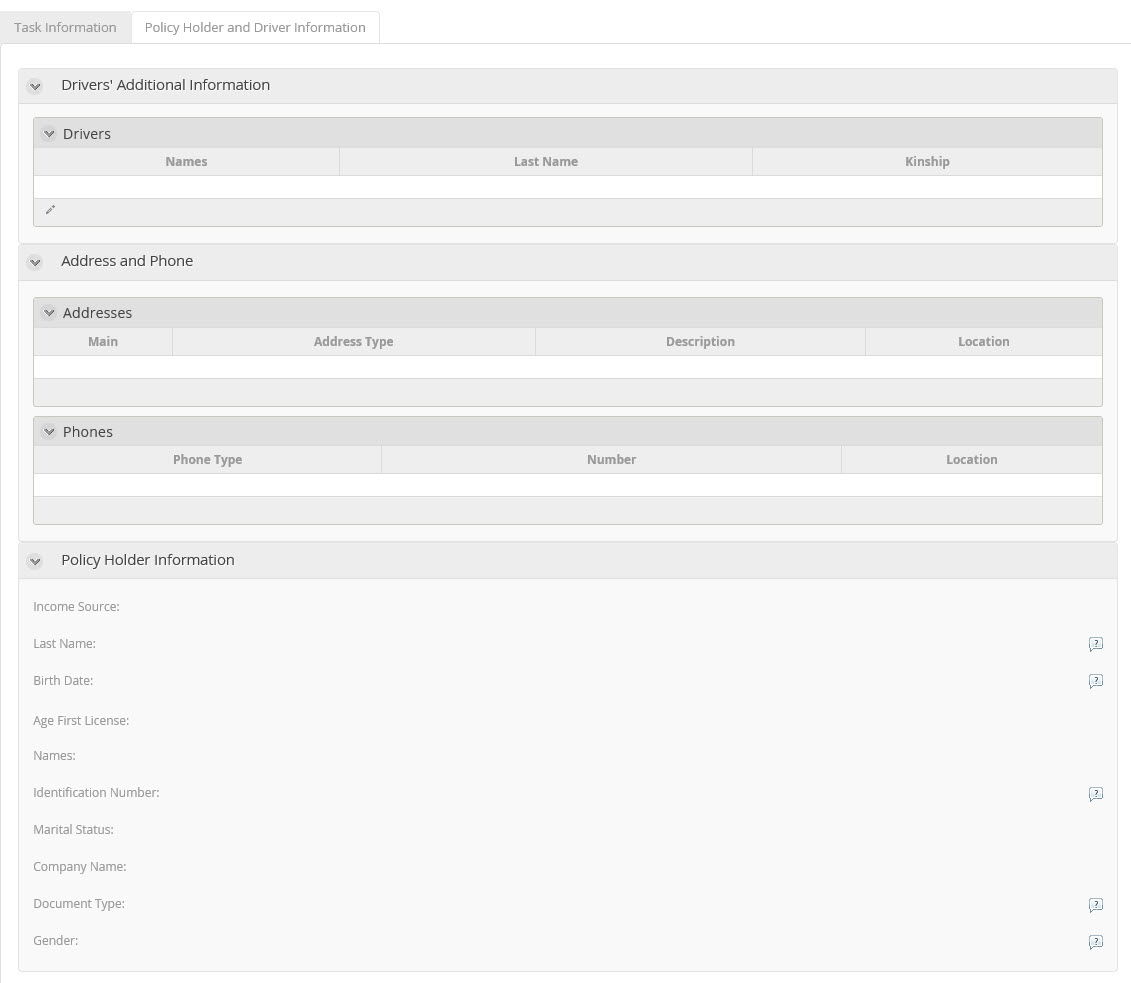
Policy Holder and Driver Information Tab
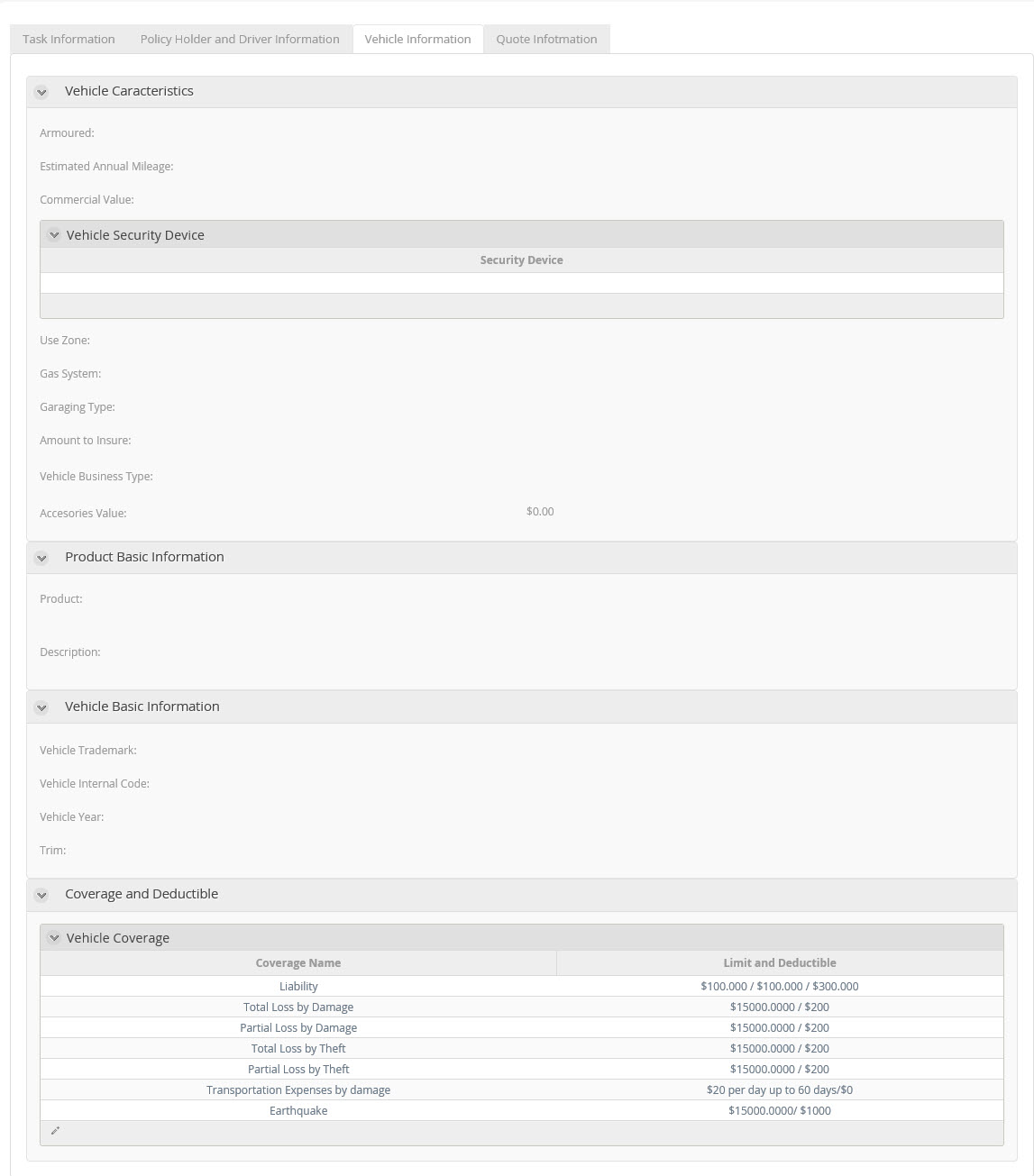
Vehicle Information Tab
Quote Information Tab

Process Elements
Start
The none start event  indicates that the Vehicle Insurance Policy Request process has begun.
Parallel Gateway
This parallel gateway  enables the option to cancel the process from the beginning.
Actions
Type |
Description |
|---|---|
On Exit |
•Set Request Date: The date of the request is entered with today's date. •Set Request Number: A number is assigned to the Request, this sequential number starts at one and increases one by one. |
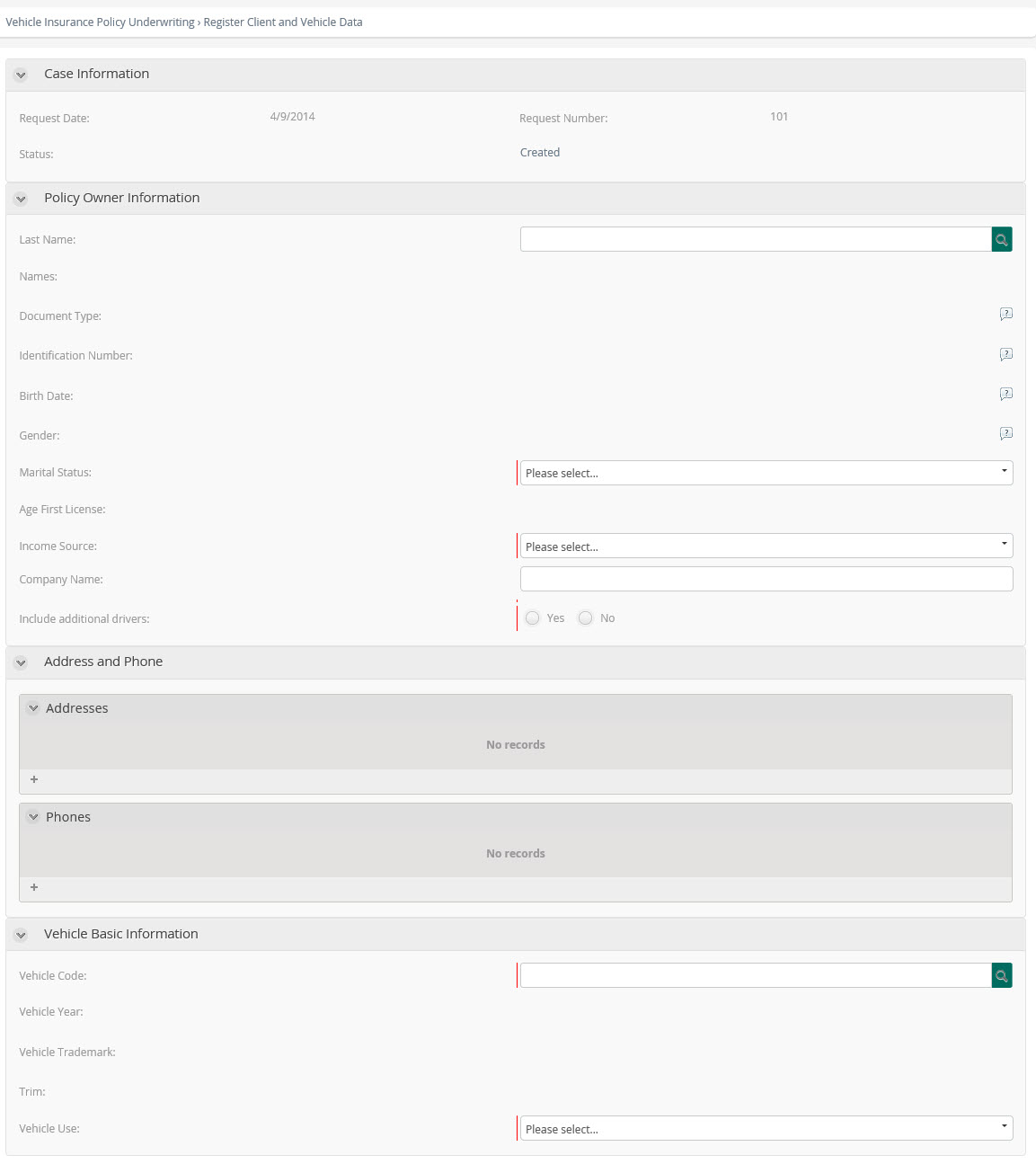
Register Client and Vehicle Data
The Vehicle Insurance Policy Request process  begins when a consultant or intermediary gathers all necessary information from the policyholder, including details of the vehicle to be insured—such as make, class, type, model, and usage—as well as information on any additional insured parties to be included.
Performers
Main Agent, Agent or Intermediary.
Actions
Type |
Description |
|---|---|
On Enter |
Set Request Status: Upon entry the status of the case is changed to "Created". |
On Exit |
If additional drivers are to be included, verify that a corresponding record exists in the table. |
Form
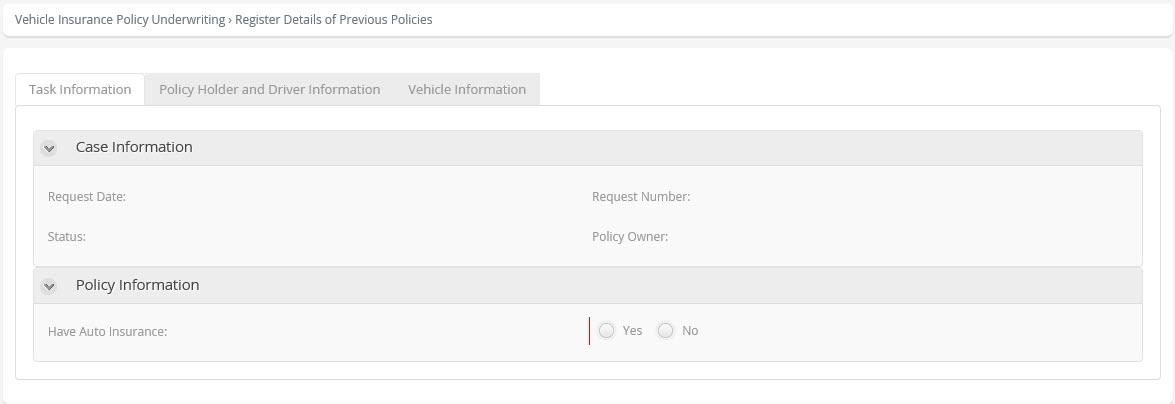
Register Details of Previous Policies
The consultant or intermediary must collect details of the vehicle’s current policy or its most recent policy. Additionally, if the policyholder does not have a No Claims Discount, the policyholder’s accident or incident history should also be included.
Performers
Agent or Intermediary.
Actions
Type |
Description |
|---|---|
On Exit |
If the customer does not have a No Claims Discount, the application must include at least one recorded incident. |
Form
Register Features and Select Product
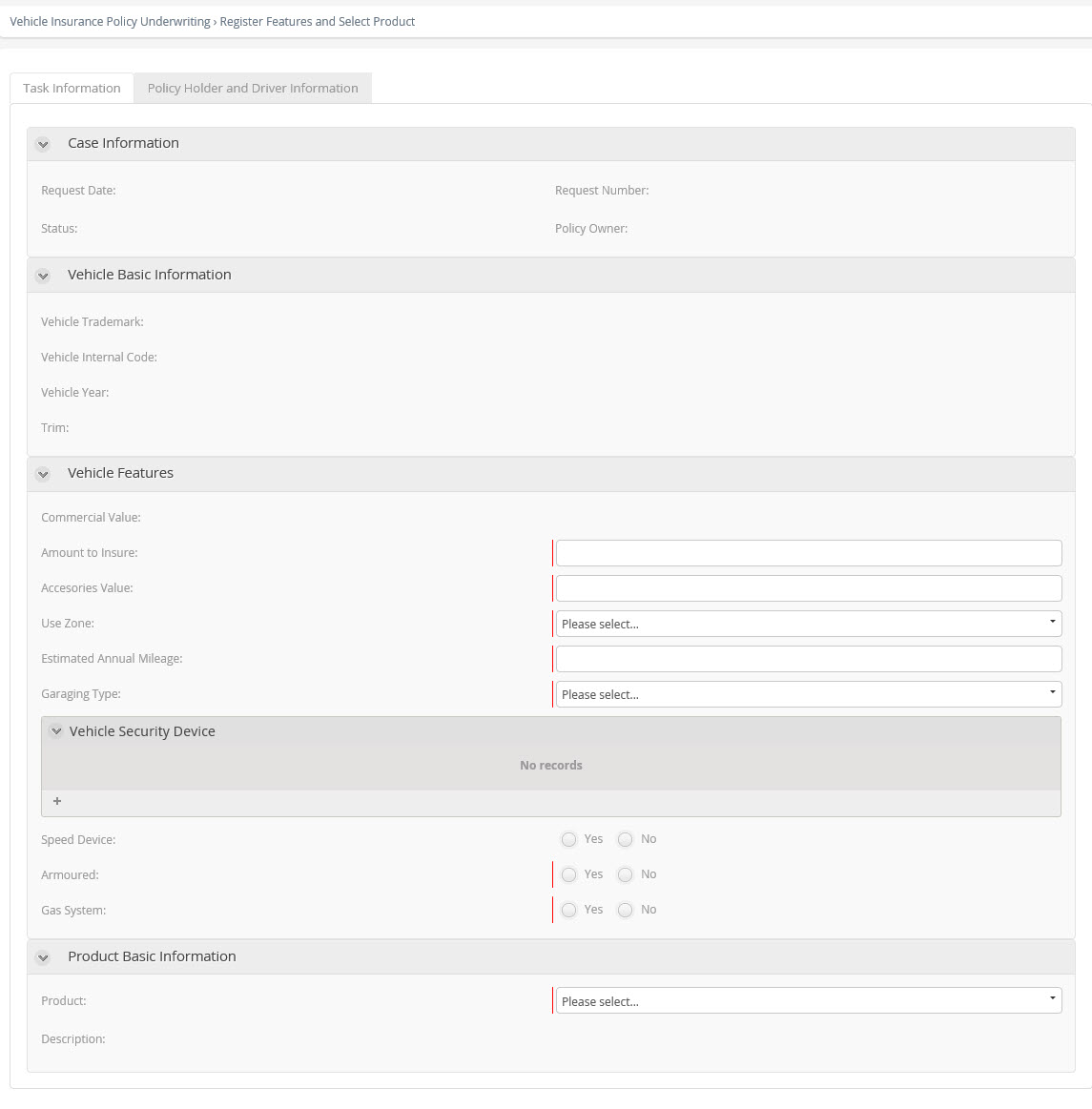
In this phase, all required activities and validations for generating the vehicle insurance quotation are carried out. The user (agent, intermediary, or main agent) enters specific details about the vehicle, such as the insured amount, accessory value, circulation zone, and other features necessary for the policy quotation. Based on the vehicle’s characteristics, the user can select the product that best meets the coverage requirements. For each product selected, a brief description of its coverage will be displayed.
Performers
Agent or Intermediary.
Actions
Type |
Description |
|---|---|
On Enter |
Set Request Status ("Pending Quotation"): Change the status of the application to "Pending Quotation". |
On Exit |
•Insured Amount oMust fall within the company’s established minimum and maximum limits. oThese limits are based on a percentage of the vehicle’s commercial value. •Accessory Value oChecked to ensure it does not exceed a defined percentage of the vehicle’s commercial value. •Security Devices oThe vehicle must meet the minimum required number of security devices. •Policy Adjustments oAll these values can be modified directly in the web application by updating vocabulary and policy definitions. •Compliance with Company Policies oVerification ensures that the vehicle, its features, and the selected product do not violate any company policies for issuing the policy. •Interface Objective oValidation of specific company policies is performed through an interface with the responsible system to avoid duplicating business logic in Bizagi. oBizagi includes general policies to guarantee data quality but does not manage all exceptions or insurability rules. •Simulation Rule oA rule exists in Bizagi to simulate this interface and verify the insured amount. |
Form
Exceeds Policies?
This exclusive gateway  verifies the result of the interface that checks compliance with the company’s policies for the vehicle and the selected product. There are two possible outcomes:
•Compliant: The vehicle and product meet the entity’s policies, and the process proceeds to coverage and deductible verification.
•Rejected: The combination violates one or more policies. In this case, the process returns to the Enter Features and Select Product activity, where the user reviews the rejection reasons and adjusts the product selection accordingly.
Gates
•YES - Condition: Exceeds the policies of the product.
•NO - Condition Type: Default.
Import Vehicle Coverages and Deductibles
This activity  establishes an interface with the system that manages the company’s vehicle insurance products and imports the protection options and deductibles associated with the selected product or coverage level.
Actions
Type |
Description |
|---|---|
On Exit |
To execute the interface that imports the protection and deductibles for the selected product, several rules are applied to simulate the import of coverage details, insured limits, and deductibles associated with that product. |
Implementation
Web Service.
Verify Coverages and Deductibles
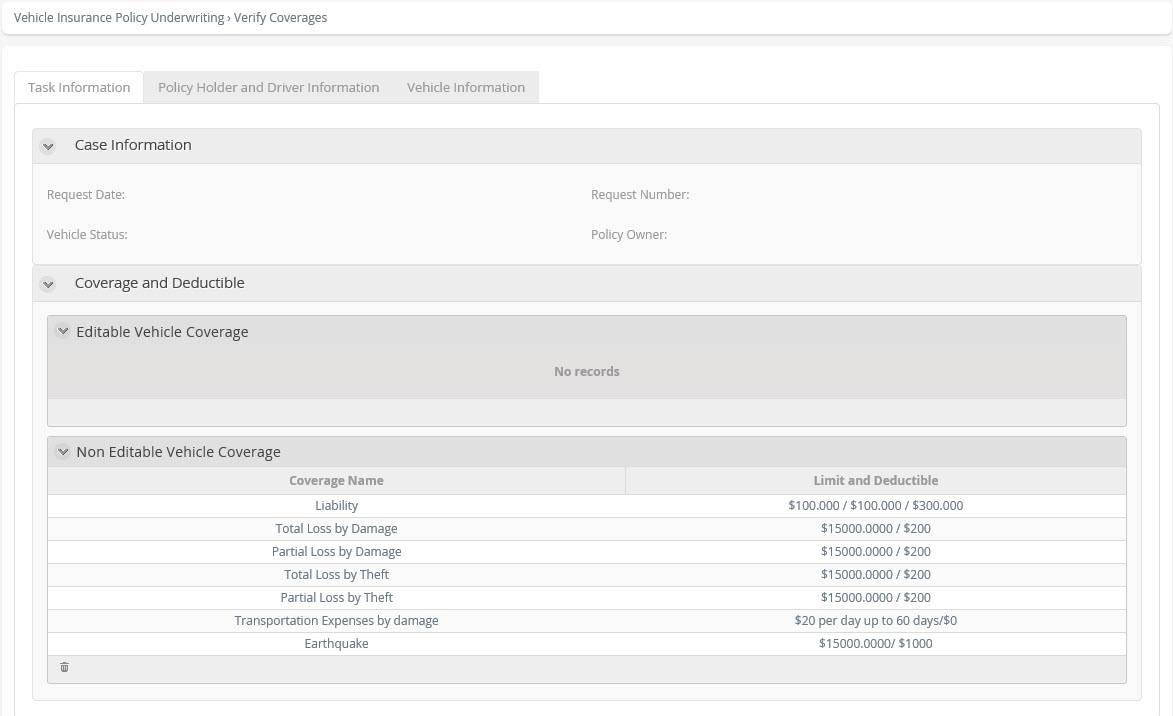
In this activity, the user can review the details of the selected product, including the protection offered, insured limits, and applicable deductibles. Additionally, the user may adjust deductibles for any coverage that allows modification.
Performers
Agent or Intermediary.
Actions
Type |
Description |
|---|---|
On Enter |
Set Request Status (Pending Quotation): Change the status of the application to "Pending Quotation". |
On Exit |
Verify Deductibles: To validate that all protection has a deductible selected, only one for each cover. |
Form
Verify Coverages and Deductibles Policy
Represented by . When users have the option to modify deductibles or remove certain protections, this activity ensures that the selected combination of coverage and deductible amounts complies with the company’s policies and does not violate any restrictions. If restrictions are detected, the case is marked as ‘Rejected due to Policy,’ and the reason for rejection is recorded so the user can make corrections and retry the quotation. This verification is performed through an interface with the company’s quotation system to avoid duplicating business logic in Bizagi.
Implementation
Web Service.
Exceeds Policies?
This exclusive gateway verifies the result of the interface that checks compliance with company policies for the selected combination of protection and deductible amounts. There are two possible outcomes:
•Compliant: The combination meets the entity’s policies, and the process proceeds to the vehicle insurance quotation.
•Rejected: The combination violates one or more policies. In this case, the process returns to the Verify Protection and Deductibles activity, where the user reviews the rejection reasons and adjusts the protection and deductible selections accordingly.
Gates
•YES – Condition: Exceeds the policies of the company.
•NO – Condition Type: Default.
Quotation
In this activity , the necessary information (details of vehicle and insured, features of the vehicle, protection, deductibles and selected product) is sent to the system of the insurance company that prepares the quotation. This interface returns the amount of the premium to be paid, as well as other relevant data.
Actions
Type |
Description |
|---|---|
On Exit |
A dummy Web Service is invoked over the internet, which returns the calculated amounts for the policy premium. |
Implementation
Web Service.
Generate Quotation File
This activity generates a PDF file with the quotation's information.
Actions
Type |
Description |
|---|---|
On Exit |
It uses an internet-based Web Service to generate a PDF file containing the quotation details. |
Implementation
Web Service.
Event Based Gateway
This gateway  enables control of the period of maximum validity of the quotation that is established by the company. If the time expires before the customer has made a decision, the process will be finalized.
Verify Quotation Results
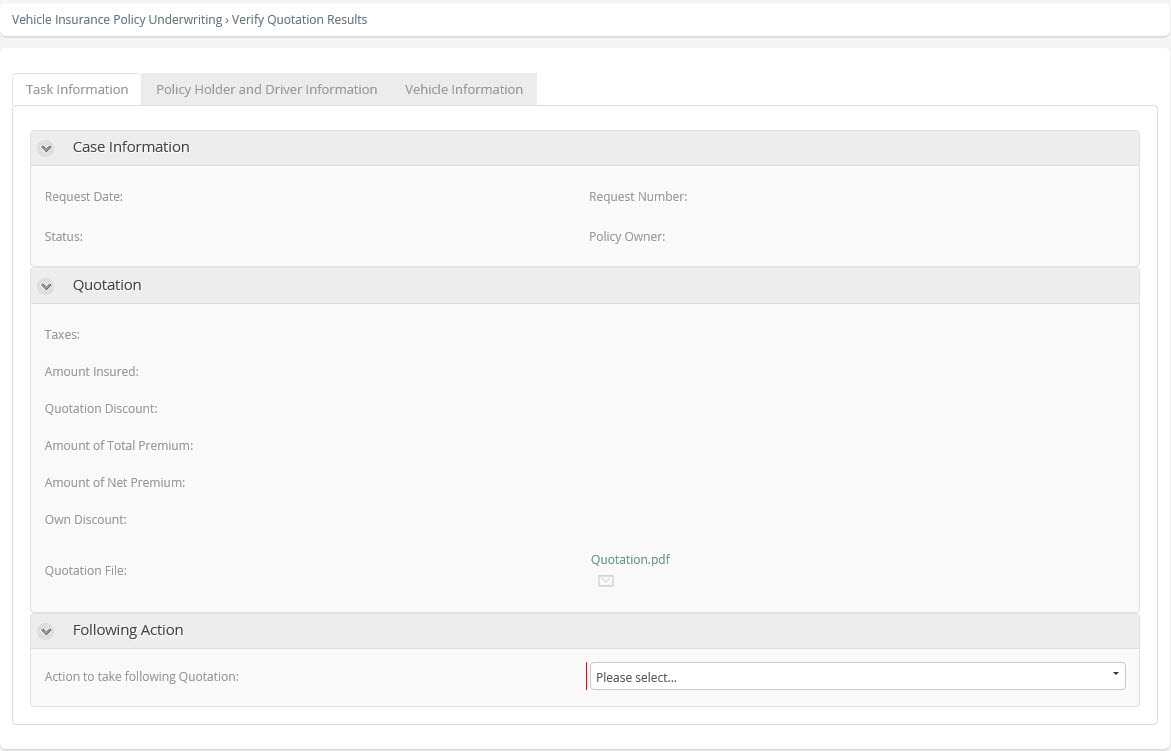
Once the insurance quotation is generated, this activity displays the results, including the premium amount, taxes, discounts, and other relevant details. At this stage, the user can choose one of the following actions:
•Accept the quotation and proceed with the process.
•Reject the quotation and close the case.
•Return to the Enter Details and Select Product activity to modify vehicle or product information and re-quote.
•Return to the Verify Coverages and Deductibles activity to adjust deductibles for the selected product and re-quote.
Performers
Agent or Intermediary.
Actions
Type |
Description |
|---|---|
On Enter |
Set Request Status (Quoted): Change the status of the application to "Quoted". |
Form
Action to Take?
This exclusive gateway determines the next step based on the customer’s decision regarding the quotation amount. The process can follow one of these paths:
•Accept the premium and proceed to the Collect Additional Information activity.
•Reject the premium, which closes the process.
•Modify vehicle features or the selected product, returning to the Include Features and Select Product activity.
•Adjust product deductibles, returning to the Verify Protection and Deductibles activity.
Gates
•Accept quotation- Condition: Accept the quotation.
•Modify coverages and/or deductibles - Condition: Amend the coverages or the deductibles for the product.
•Change product - Condition: Amend the features of the vehicle or the chosen product.
•Reject Quote - Condition: Reject the quotation.
Register Additional Information
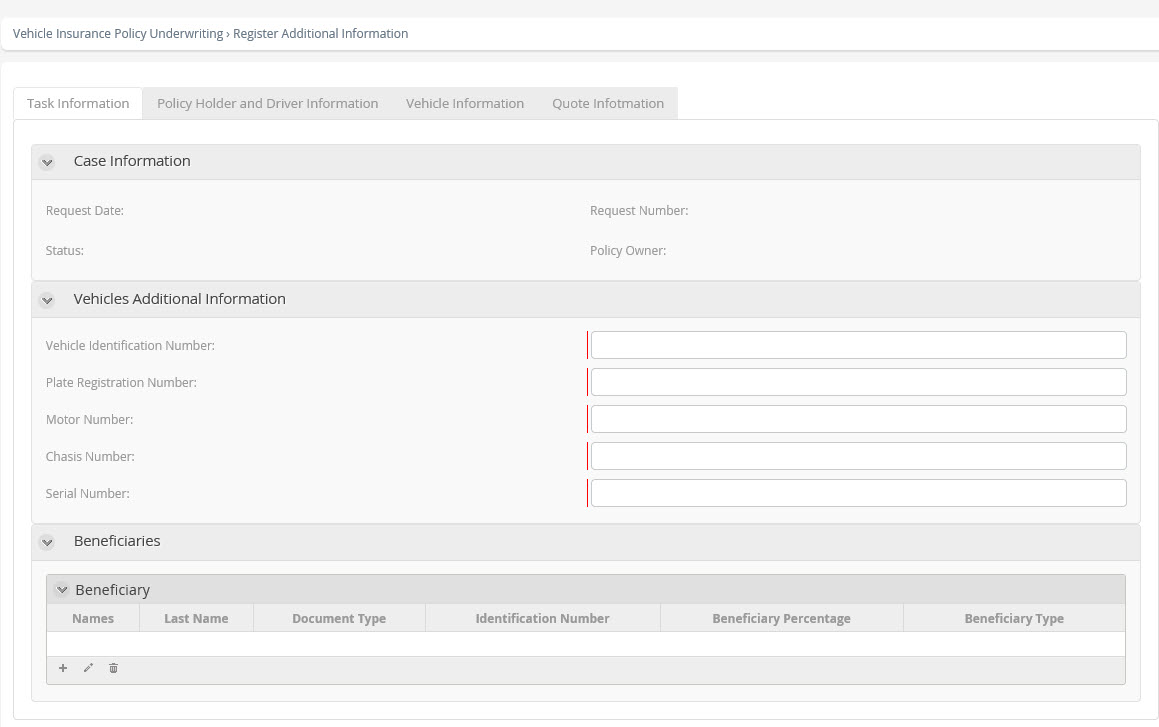
After the customer accepts the quotation, the process continues with collecting additional details about the vehicle and beneficiaries required for risk verification and policy issuance. These details, which were not needed for the quotation, include information such as the vehicle’s VIN, registration number, engine number, and other relevant data.
Performers
Agent or Intermediary.
Actions
Type |
Description |
|---|---|
On Enter |
•Set Request Status ("Issue Pending"): Change status to "Issue Pending". •Copy the information of the policyholder as information of the main beneficiary of the policy. |
On Exit |
•The system verifies that at least one beneficiary is associated with the application and that the assigned percentages total 100%. •Next, the policy logic determines whether a vehicle inspection is required. This rule can be modified in the production web application. Currently, vehicles with models from 2010 or newer do not require inspection. |
Form
Risk Analysis
Vehicle and insured details are sent through an interface to perform the risk analysis . The interface returns one of the following responses:
•Risk Approved
•Risk Rejected (including the reason for rejection)
•Authorization Required from a Main Agent
Actions
Type |
Description |
|---|---|
On Exit |
This step executes the interface responsible for performing the risk analysis. Its purpose is to verify whether the policyholder or the vehicle appears on any of the company’s negative lists. To simulate this process, a dummy interface is used, which returns one of three possible results—Approved, Rejected, or Approval Required—based on the information provided. Result Conditions: •Rejected: Policyholder’s ID has fewer than 5 digits and the Vehicle Identification Number (VIN) has more than 7 digits. •Approval Required: Policyholder’s ID has fewer than 5 digits or the VIN has 7 or more digits. •Approved: Policyholder’s ID has 5 or more digits and the VIN has fewer than 7 digits. |
Implementation
Web Service.
Risk Analysis Results
This exclusive gateway determines the path taken depending on the result produced by the Risk Verification interface.
The process can take one of the following paths:
•Risks approved, and continue the process with the inspection of the vehicle in case this is necessary.
•Risks rejected, whereby notification will be sent and the process finalized.
•Approval required for risks whereby an approval task is generated for the main agent who should analyze the situation and decide whether it is approved or rejected.
Gates
•OK - Condition: The result is Risks approved.
•Approval required - Condition: The result is requires approval.
•Risk Rejected - Condition: The result is Risks rejected.
Review Risk Analysis Results
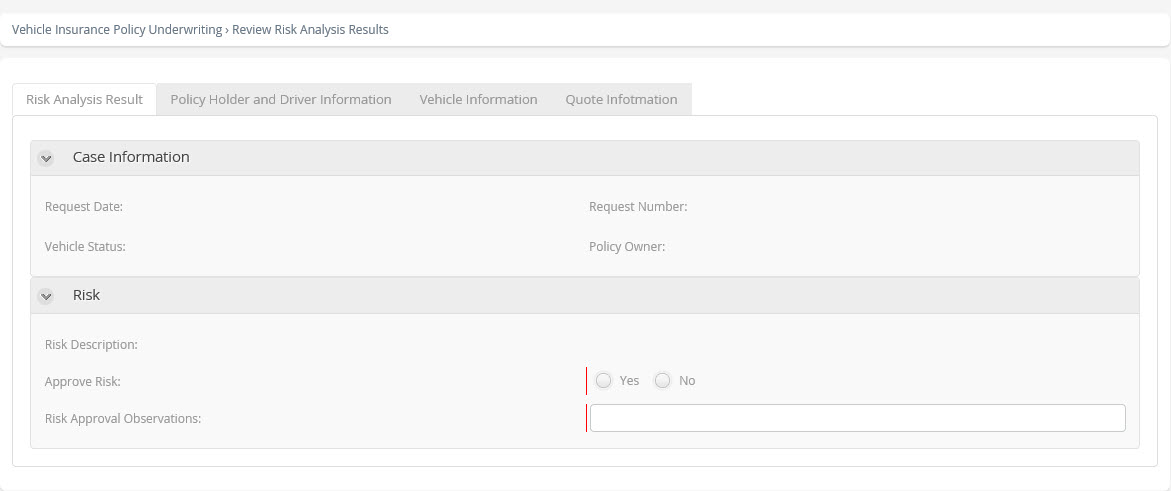
When the response is Request Authorization from a Main Agent the case is assigned a designated role who should evaluate the risk presented and decide whether to authorize or reject it.
Performers
Main Agent.
Actions
Type |
Description |
|---|---|
On Exit |
Set Request Status: Change status to "Authorized Risk" when the risk was approved and Change status to "Rejected by risk". |
Form
Risks Approved?
This exclusive gateway determines the path taken by the process once Verification of the Risk Analysis result has been performed.
In this case, the user can approve or reject the risks.
•In the case of approval, the process will continue with the inspection of the vehicle if this is required.
•In the case of rejection, notification will be sent and the case closed.
Gates
•Yes - Condition: Risk was Approved.
•No - Condition: Risk was Rejected.
Parallel Gateway 2
This parallel gateway enables the reception of documents in parallel with the inspection and policy issue.
Inspection Required?
This exclusive gateway determines the path taken depending if the vehicle requires an inspection or not.
•If an inspection is required, the process enters the Inspection sub-process.
•If an inspection is not required, the process continues with the policy issue.
Gates
•Yes - Condition: If an inspection is required, this is determined by a policy that can be amended in the Web application.
•No - Condition: Inspection not required. In this case the policy indicates that if the model of the vehicle is equal to or later than 2010, inspection is not required. This can be amended in the Web application.
Inspection
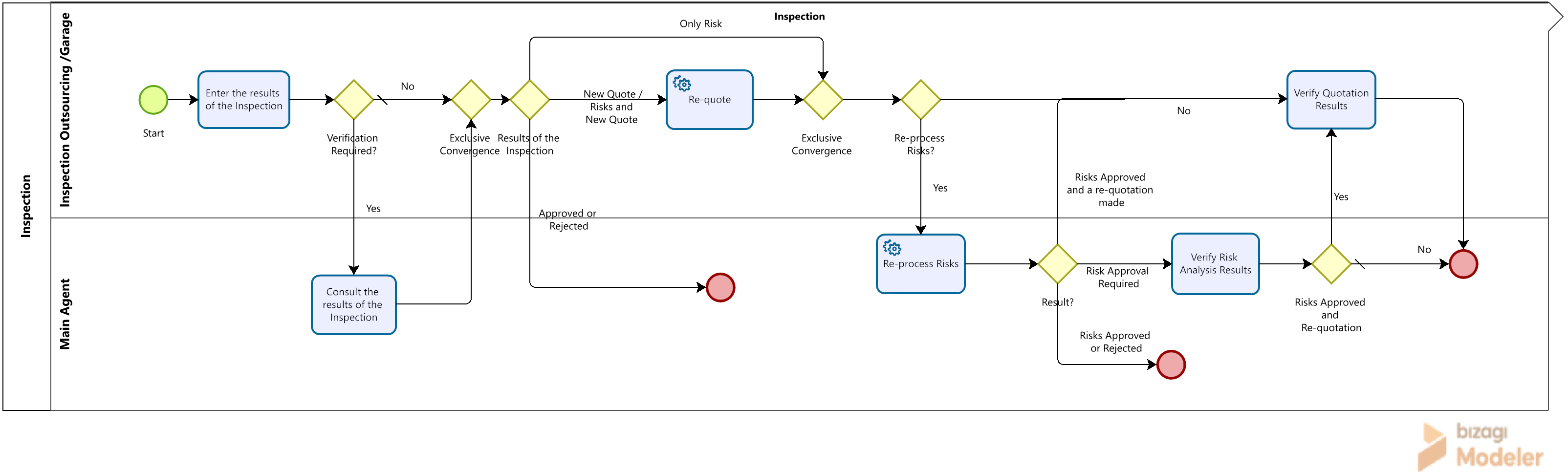
Before the policy is issued, it is necessary to inspect the vehicle and its accessories  . The inspection can be performed by means of a sub-process. The result of the inspection can be accepted, rejected, consult main agent, make new quotation, re-process risks or to quote and re-process risks again. When a new quotation is made the main agent or intermediary owner of the case can consult the result of the quotation and decide whether or not to accept it, and, similarly, await the rejection, acceptance or authorization of the risks.
Performers
Agent or Intermediary.
Diagram
Inspection.
Process
Inspection.
Satisfactory Inspection?
This exclusive gateway determines the path taken depending on the result produced by the Inspection. The process can take one of the following paths:
•Inspection is satisfactory and the process continues with the policy issue.
•Inspection rejected whereby notification will be sent and the process finalized. Within the inspection sub-process, it is possible that the result could be unsatisfactory due to the result of the inspection, re-quotation and rejection by the customer or the risk analysis.
Gates
•No - Condition: Evaluate the result of the inspection sub-process, take this path if the vehicle was rejected due to the inspection or was rejected due to the risks or the quotation was rejected within the inspection process.
•Yes - Condition Type: Default.
Exclusive Gateway Convergence
This exclusive gateway acts as a convergence point, merging the two possible paths—inspection required or not—into a single flow to ensure synchronization in subsequent steps.
Issue Policy
This interface is for the creation of the policy in the main system of the insurance company . By means of this interface, all the details of the vehicle, features, and in general, all the data that has been captured during the process, is sent to the policy system with the aim of creating the policy.
Actions
Type |
Description |
|---|---|
On Exit |
Execute the interface that creates the policy. |
Implementation
Web Service.
Generate Policy Files
This activity generates a PDF file of the policy in order that it can be printed.
Implementation
Web Service.
Verify Policy and Print
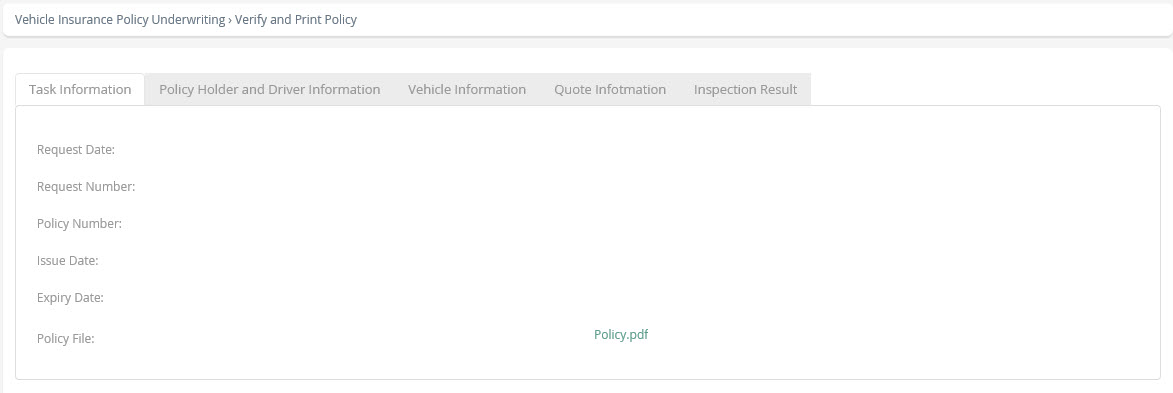
The policy is generated through an interface after the inspection phase. In this activity, the user can review the policy details and then proceed to print the document.
Performers
Agent or Intermediary.
Actions
Type |
Description |
|---|---|
On Enter |
Set Request Status (Policy Issued): Change the status to "Policy Issued". |
Form
Receive Documents
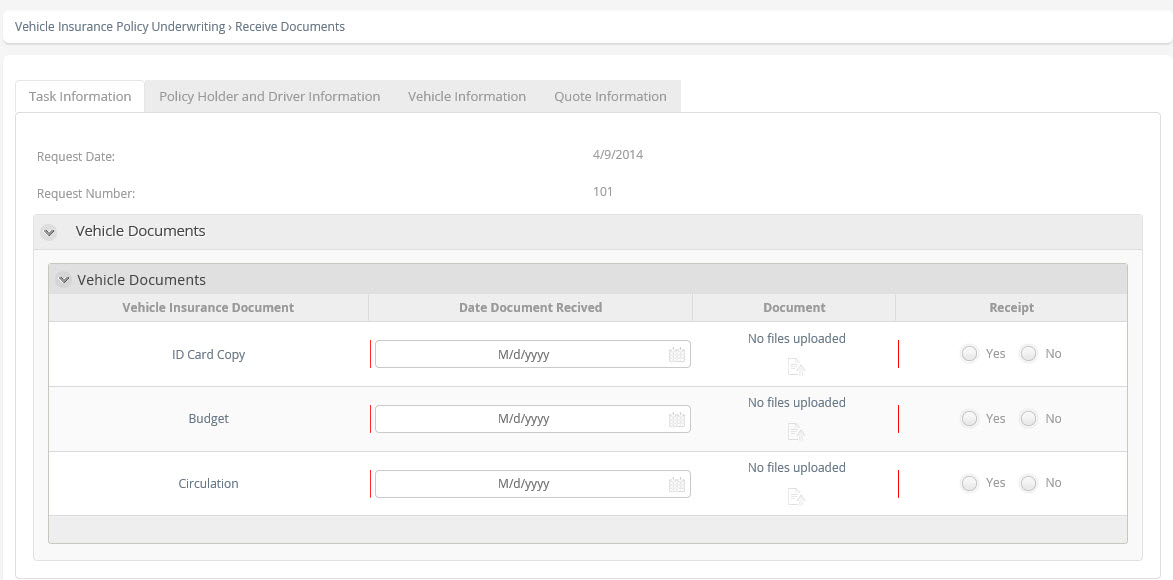
The required documents are requested for the policy according to the nature of the vehicle, and the policy is issued  .
.
Actions
Type |
Description |
|---|---|
On Enter |
Add documents to the request. |
Form
End
Indicates the end of the process  . The process is finalized when the policy has been issued and the documents received.
Notify Rejection
This activity  enables the dispatch of an email to the person who created the case when it has been rejected, and is then finalized.
There are 3 possible reasons:
•Customer rejects the new quotation.
•Vehicle rejected due to inspection.
•Rejected due to risk analysis.
Actions
Type |
Description |
|---|---|
On Enter |
Set the contact mail. |
Script
Request for vehicle insurance rejected due to inspection
Dear [],
We regret to inform you that your application for vehicle policy number <InsurancePolicyRequest.RequestNumber> has been closed due to the inspection being rejected.
The observations of the inspection were as follows:
For further information, consult the case
Sincerely,
Bizagi Insurance
This email was generated automatically. Please do not reply
Request for vehicle insurance rejected due to non-acceptance of the quotation
Dear [],
We regret to inform you that your application for vehicle policy number <InsurancePolicyRequest.RequestNumber> has been closed because the policyholder did not accept the new quotation.
The observations of the inspection were as follows:
For further information, consult the case.
Sincerely,
Bizagi Insurance
This email was generated automatically. Please do not reply
Request for vehicle insurance rejected due to risk analysis
Dear [],
We regret to inform you that your application for vehicle policy number <InsurancePolicyRequest.RequestNumber> has been closed due to the risks.
The observations of the result of the risk analysis are the following:
For further information, consult the case.
Sincerely,
Bizagi Insurance
This email was generated automatically. Please do not reply
Terminate End
The process ends  because the inspection was rejected, the risks were rejected or the quotation made in the inspection sub-process was not accepted.
Terminate End 2
The process ends when the Quote was rejected.
Period of Validity of Quotation
Each insurance company defines a period of validity for quotations  . This intermediate timer event controls this time. If the period expires and no decision has been made, the process will be closed automatically. This time can be changed directly in the Web application, changing the definition of the vocabulary of the process called "Period of validity of the quotation (minutes)".
Cycle
20 days.
Notify Quotation Validity Expired
When the period of validity of the quotation expires, an activity that sends an email to the agent originating the case is generated, informing its closure.
Actions
Type |
Description |
|---|---|
On Enter |
Set the contact mail. |
Script
We write to inform you that the Vehicle Insurance Policy Request number <InsurancePolicyRequest.RequestNumber> has been closed due to the expiration of the period of validity of the quotation.
Sincerely,
Bizagi Insurance
This email was generated automatically. Please do not respond.
Terminate End 3
The process has finished as the period of validity of the quotation, has expired.
Event Based Gateway
This event-based gateway allows control of the cancellation of the process only up to before the policy is issued, that is once the process is in the policy issue stage, this cancellation event is no longer available.
Cancel Case
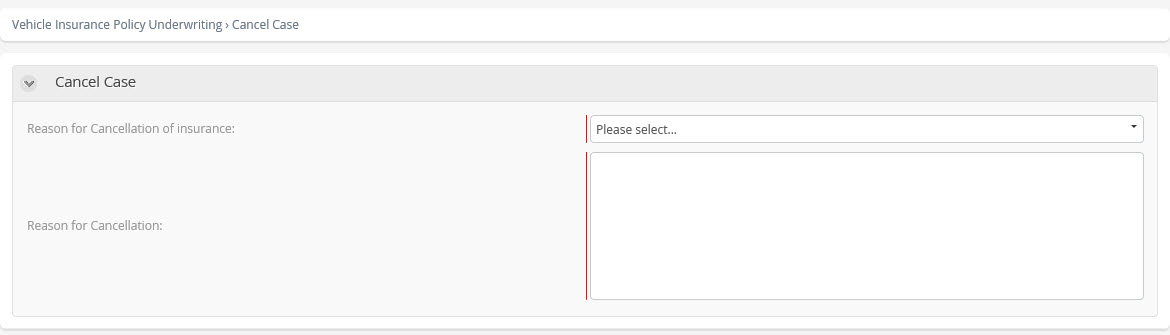
This event allows the user to cancel the case from when the process begins until before the policy is issued, i.e. once the process arrives at the policy issue event, this is not available. This is available for all users that have the agent or main agent role.
Form
Notify Cancellation of the Case
This activity sends an email notification to the user who created the case, informing them of the cancellation when it was performed by someone other than the case creator.
Script
Dear [],
We wish to inform you that case number <InsurancePolicyRequest.RequestNumber> has been cancelled due to: <InsurancePolicyRequest.InsuranceCancellationRea.CancellationReasonName>.
The observations of this cancellation are as follows:
<InsurancePolicyRequest.CancellationReason>
For further information, consult the case.
Sincerely,
Bizagi Insurance
This email was generated automatically. Please do not reply.
Terminate End 4
When the process arrives at this End , the process finishes completely regardless of whether there are pending activities or not. This End is reached once the case has been canceled.
Disable Cancellation of the Case
This event  allows the disabling of the cancellation of the case once the normal process arrives at this point, i.e. once the vehicle has passed through the inspection phase, it continues with the policy issue without being able to cancel the case.
Condition
InsurancePolicyRequest.Enablecasecancellation is false.
Inspection
Scope
Define a process in which the final inspection result is recorded, analyzed, and a decision is made based on that result. The possible actions include re-quoting, reprocessing the risks, consulting, or performing both actions.
Definitions
•Inspection: is carried out to evaluate the vehicle’s external components and basic mechanical systems. Its primary purpose is to determine the overall condition of the unit, ensuring compliance with the credit granted by the financial institution, assessing its suitability for subsequent insurance coverage, and confirming the conditions necessary to make informed decisions regarding the renewal of vehicle policies. All findings from the inspection are documented in the Vehicle Inspection Technical Report.
Contact points with External Systems
1. Quotation
Objective: To provide all relevant details from the quotation, including vehicle and insured information, vehicle features, coverage options, deductibles, and the selected product. Additionally, return the policy amount, specifying the premium before tax, applicable taxes, and the net premium. It is important to note that, in this case, the transmitted data is based on the results obtained from the inspection.
2. Verification of Risks
Objective: Transmit the vehicle and policyholder details to check against negative lists. Return a risk assessment indicating either a positive or negative result. In the case of a negative outcome, provide the specific reason for rejection.
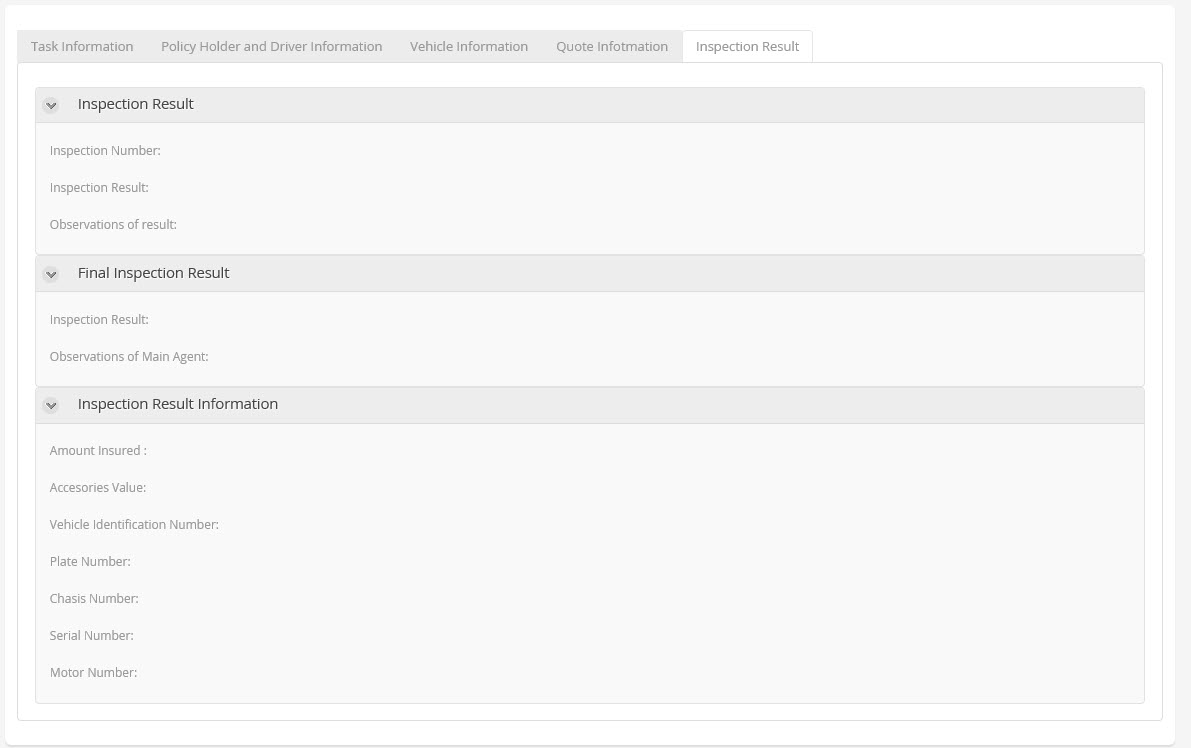
Inspection Result Tab
Process Elements
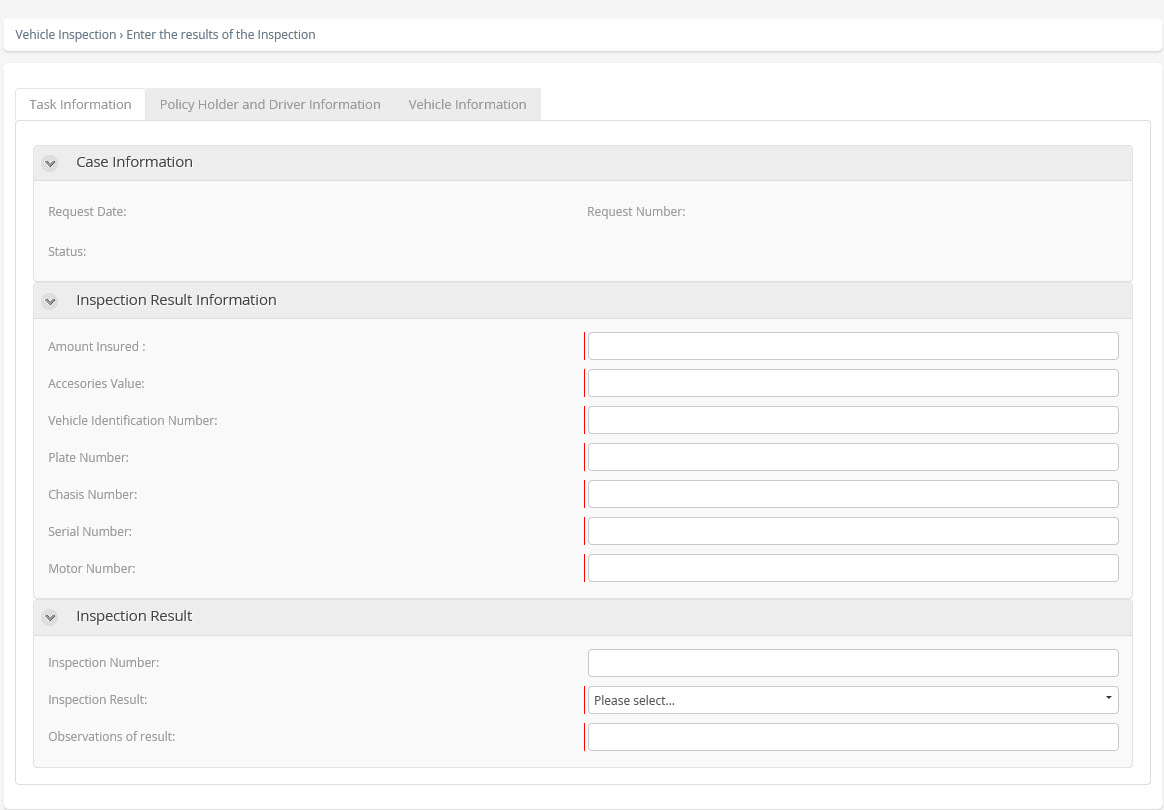
Enter the Results of the Inspection
In this activity, the final result of the inspection should be recorded.
Performers
Inspection Outsourcing or Workshop.
Actions
Type |
Description |
|---|---|
On Exit |
Set Request Status (Inspected): Change the status of the case to "Inspected". |
Form
Verification Required?
This exclusive gateway determines whether the result of the inspection should be reviewed by a higher authority to determine what action is to be taken.
•If a review is required, an activity is generated for the main agent.
•If a review is not required, it continues with the decision that evaluated the action to be taken as a result of the inspection.
Gates
•No - Condition: Default.
•Yes - Condition: Verify if the result of the inspection should be reviewed by a higher authority.
Consult the Results of the Inspection
A consultation is initiated when the final inspection result is unclear to the entity that performed the evaluation. In such cases, an expert appointed by the insurance agency reviews the situation and determines the next steps. The expert may decide to re-quote the policy, reprocess the risk assessment, perform both actions, accept the vehicle, or reject it.
Performers
Main Agent.
Actions
Type |
Description |
|---|---|
On Exit |
•Check Inspection Result. •Check Decision Manual: Validation on the result of the inspection, if the insured values changed, then a quote must be obtained, if the data of the vehicle changed, a risk analysis must be carried out. |
Form
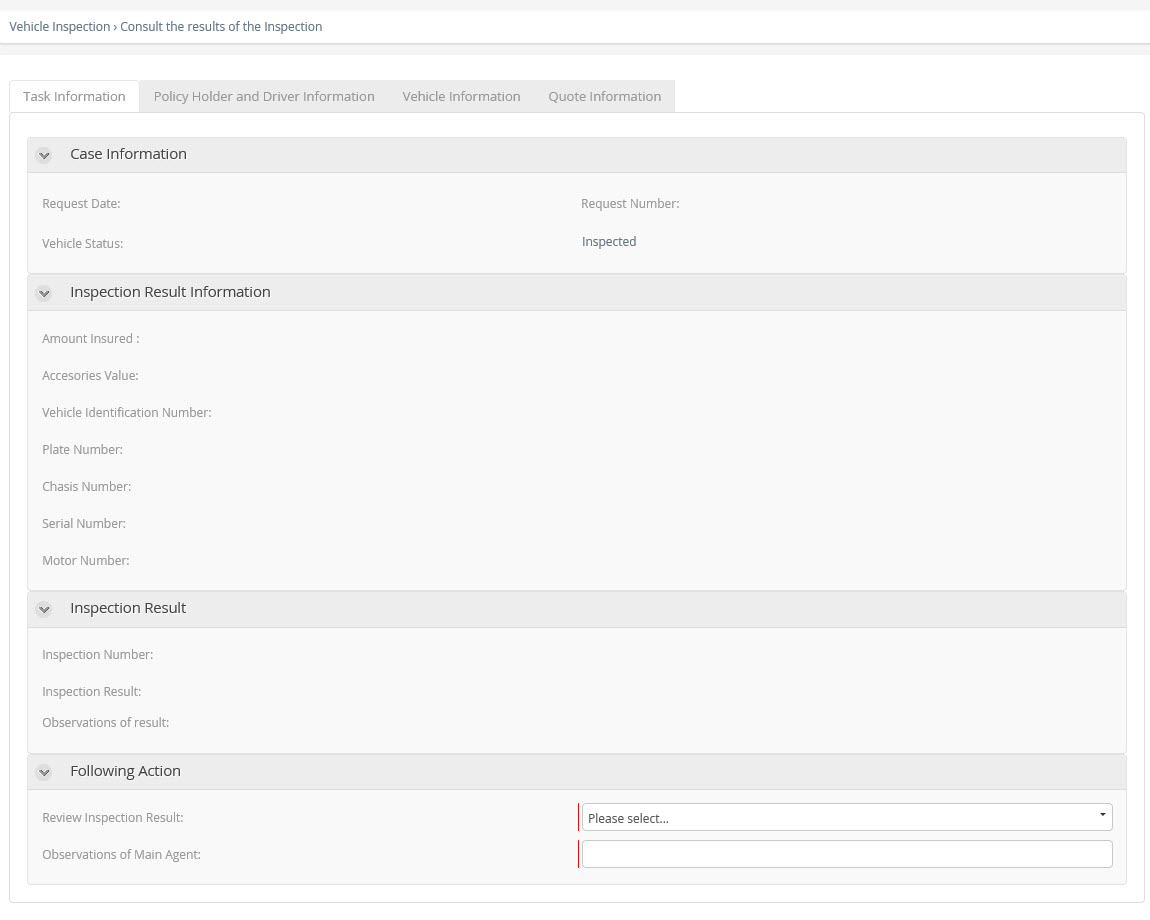
Results of the Inspection
This exclusive gateway determines the path taken depending on the result produced by the Inspection.
The process can take one of the three following paths:
•End the sub-process when:
oInspection Approved, the inspection sub-process is finalized to continue with the policy issue in the parent process.
oInspection Rejected, the inspection sub-process is finalized to continue with the notification and closure of the case within the parent process.
•Re-process Risks, whereby a risk analysis is performed by means of the interface with the new information of the vehicle.
•Re-quote, whereby a new quotation is made with the new information about the vehicle.
Gates
•Only Risk - Condition: If the process requires only the risk analysis to be re-processed.
•Approved or Rejected - Condition: If the inspection was approved or rejected.
•New Quote / Risks and New Quote - Condition: If the process requires the risk analysis to be re-processed or Re-quote.
Re-quote
In this activity , the insurance is re-quoted with the information obtained from the vehicle inspection, whereby the necessary information to make the quotation, (details of vehicle and insured, features of the vehicle, protection, deductibles and selected product) is sent to the system of the insurance company that prepares the quotation. This interface returns the amount of the premium to be paid, as well as other relevant data.
Actions
Type |
Description |
|---|---|
On Exit |
Execute the interface that carries out the quotation. |
Implementation
Web Service.
Re-process Risks?
This exclusive gateway determines if it is required to re-process the risk analysis depending on the result of the inspection.
•If the process requires the risk analysis to be re-processed, a risk analysis is performed by means of the interface, with the new information of the vehicle.
•If it is not necessary to re-process the risks, it will go to the Accept or Reject Quotation activity where the user can verify the result of the re-quotation.
Gates
•No - Condition: If it is not necessary to re-process the risks.
•Yes - Condition: If the process requires the risk analysis to be re-processed.
Re-process Risks
Represented by . Send the details of the vehicle and the policy holder, return a result of negative or positive risk and, in the case of negative, a reason for rejection.
Actions
Type |
Description |
|---|---|
On Enter |
Execute the interface that carries out the risk analysis. |
Implementation
Web Service.
Result?
This exclusive gateway determines the path taken depending on the result produced by the Risk Verification interface. The process can take one of the three following paths:
•Risks Approved and quotation made, continue the process with the Accept or Reject Quotation activity where the user can verify the result of the re-quotation.
•End the Parent sub-process when:
oRisks rejected, the inspection sub-process is finalized and it continues with the parent process, where notification is sent and the process ends.
oRisks Approved without re-quotation, the inspection sub-process is finalized and the process continues with the policy issue in the parent process.
•Approval required for risks whereby an approval task is generated for the main agent who should analyze the situation and decide whether the risks are approved or rejected.
Gates
•Risk Approval Required - Condition: Approval required for risks.
•Risks Approved or Rejected - Condition: If the risks were approved or rejected.
•Risks Approved and made a re-quotation - Condition: Risks Approved and quotation made.
Verify Quotation Results
When a re-quotation is required following the inspection, the agent handling the business directly with the customer must be consulted. Together, they will determine whether the revised premium amount is acceptable. If the premium has increased, both the customer and the agent should review the changes to ensure expectations are met. Re-quotations typically occur due to discrepancies between the original vehicle value and the value determined after inspection, as well as the inclusion of accessories not listed in the initial quotation.
Performers
Inspection Outsourcing or Workshop.
Actions
Type |
Description |
|---|---|
On Exit |
Set Request Status: Change the status of the case to "Inspected" or "Quote Rejected". |
Form
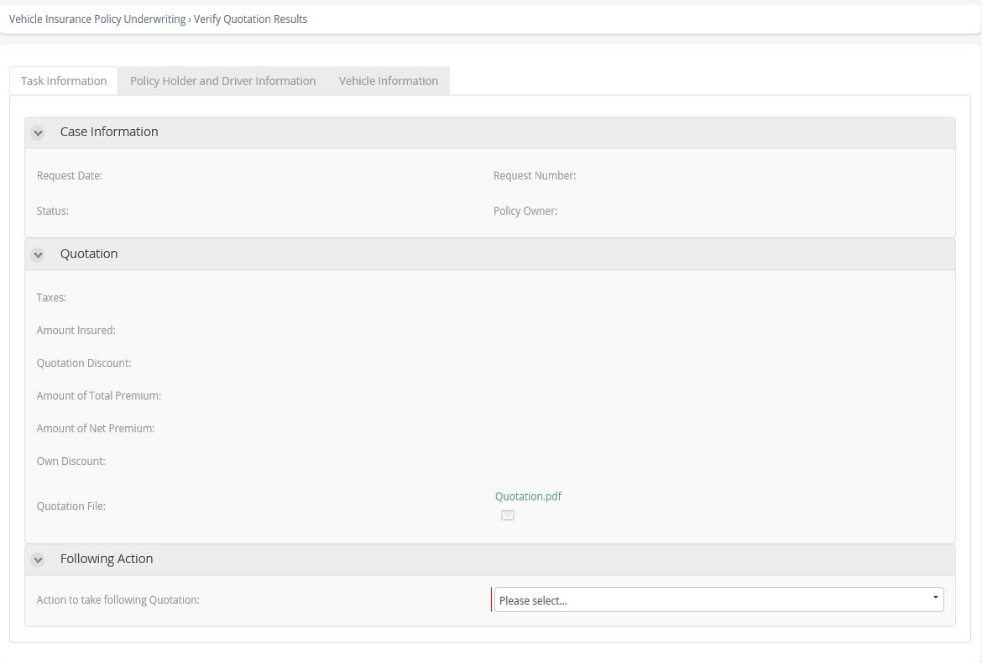
Verify Risk Analysis Results
When the final inspection results require a reprocessing of risks, the risk analysis outcomes should be reviewed. In such cases, an activity is initiated to determine whether the vehicle will be authorized or rejected. There may be situations where the level of risk does not prevent the vehicle from being insured but still warrants a detailed review by insurance experts.
Performers
Main Agent.
Actions
Type |
Description |
|---|---|
On Exit |
Set Request Status (Risk Approved): Change the status of the case to "Risk Approved". |
Form
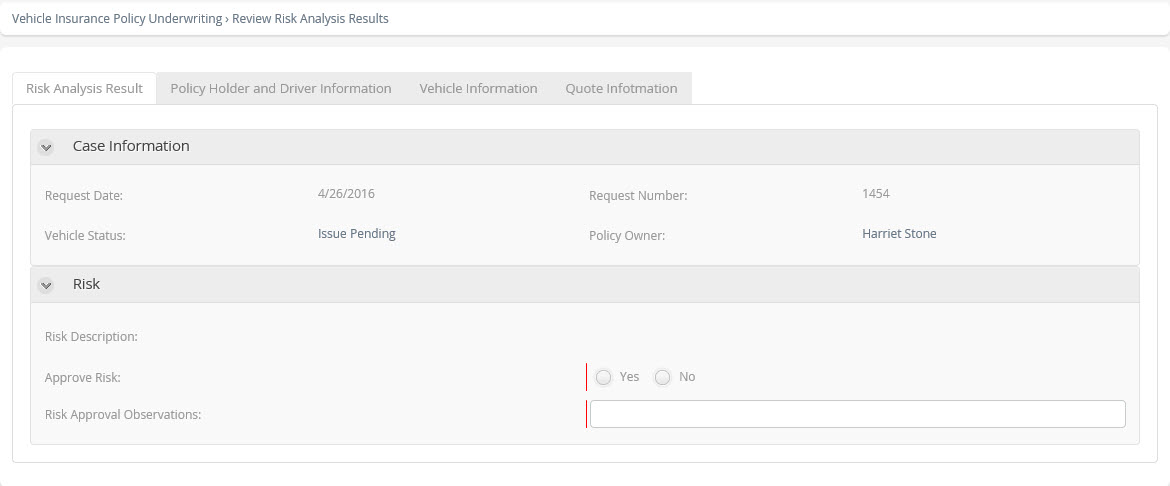
Risks Approved and Re-quotation
This exclusive gateway determines the path taken by the process once Verification of the Risk Analysis result has been performed. In this case, the process can take one of the two following paths:
•To go to the Accept or Reject Quotation activity: In the case of Risks Approved and a re-quotation made, the process continues with the Accept or Reject Quotation activity where the user can verify the result of the re-quotation.
•End of the inspection sub-process in the following cases:
oIn case of rejection, the inspection sub-process is closed, the rejection is notified and the case is finalized in the parent process.
oIn the case of approval of the risks and that it was not re-quoted, the inspection sub-process is finalized and continues with the policy issue in the parent process.
Gates
•Yes - Condition: Risks approved and re-quoted.
•No - Condition: Default.
Performers
Main Agent (Role)
Agent with the capacity to approve or reject the vehicle for different reasons, someone who depends directly on the insurance company.
Inspection Outsourcing or Workshop (Entity)
Are official workshops of the insurance company that are in charge of performing inspections on the vehicle to be insured.
Agent or Intermediary (Role)
Is the individual or company that, being connected to an insurance company by means of a contract of insurance agency, is dedicated to the negotiation or production of insurance and to the conservation of the subsequent accounts receivable, by means of necessary commercial and administrative tasks for obtaining insurance contracts that are part of it and their current maintenance.
Last Updated 1/19/2026 2:46:05 PM