Overview
Bizagi offers a collaborative environment where you and process developers can work simultaneously on the same project.
If your project includes multiple processes, you may need to restrict access to certain objects to prevent unintended modifications that could affect other processes.

By default, each new Bizagi project grants users included as Bizagi Administrators full access to all project objects. However, access rights to specific objects are not configured initially.
We recommend enabling Bizagi Studio Access Conotrol to ensure that only authorized users can manage the appropriate project objects.
Manageable access control
Access control can be managed for the following objects:
•Applications
•Processes
•Entities
•Global Business Rules
Access control management in Bizagi Studio
Access control settings can be assigned to individual users or entire user groups. The specific permissions depend on the type of object.
Permission levels
Once Access control permissions are applied to an object, Bizagi enforces access controls:
•Deny: Completely restricts access to the object.
•Modify: Allows creating, editing, and deleting the object but not modifying its Access control settings.
•Full Control: Grants full permissions, including managing Access control settings.
Permissions are inherited—having access at a higher level grants the same access to child objects unless explicitly overridden.
The following tables summarize the objects and the corresponding permissions for each type of object:
Applications and Processes Access control
Object |
Deny |
Modify |
Full Control |
|---|---|---|---|
Applications main node |
Access to Applications denied |
N/A |
N/A |
Applications |
Access to Processes and Sub-Processes denied |
Applications can be created, edited, and deleted, but security settings cannot be changed |
Applications can be created, edited, and deleted, and their security settings can be managed |
Processes |
Access to Processes denied |
Processes can be created, edited, and deleted, but security settings cannot be changed |
Processes can be created, edited, and deleted, and their security settings can be managed |
Process versions |
Access to Process versions denied |
Process versions can be created, edited, and deleted, but security settings cannot be changed |
Process versions can be created, edited, and deleted, and their security settings can be managed |
•If you have Modify permissions over an Application, you automatically have permissions over all its related processes and all elements within its hierarchical tree, including forms, business rules, expressions, and other dependencies.
•Newly created Processes inherit the Access control settings of their parent Application.
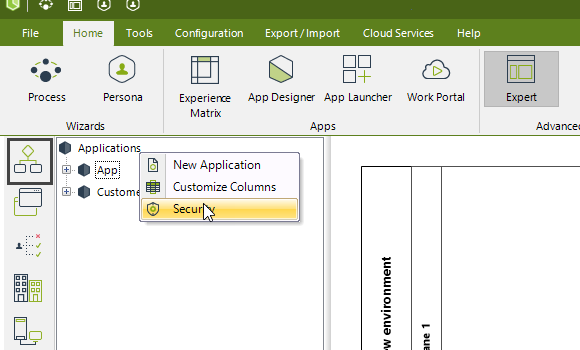
Entities Access control
Object |
Deny |
Modify |
Full Control |
|---|---|---|---|
Entities main node |
Access to Entities denied |
N/A |
N/A |
Application entities |
Access to Application entities denied |
Application entities can be created, edited, and deleted, but security settings cannot be changed |
Application entities can be created, edited, and deleted, and their security settings can be managed |
Master entities |
Access to Master entities denied |
Master entities can be created, edited, and deleted, but security settings cannot be changed |
Master entities can be created, edited, and deleted, and their security settings can be managed |
Parameter entities |
Access to Parameter entities denied |
Parameter entities can be created, edited, and deleted, but security settings cannot be changed |
Parameter entities can be created, edited, and deleted, and their security settings can be managed |
•Most projects have entities that are crucial for the proper functioning of a process, and any uncontrolled changes can affect its development. You can restrict access permissions to those entities to limit modifications.
•If you have Modify permissions over an entity, you also have permissions over all its related elements, including attributes, forms, values, queries, and expressions—all descendants within the entity’s hierarchical data.
•If Modify permissions are denied, you will not be able to modify any of the entity's elements. The elements will remain available for use in forms and expressions but they cannot be edited.
Global Business Rules Access control
Object |
Deny |
Modify |
Full Control |
|---|---|---|---|
Applications business rules |
Access to Applications business rules denied |
Application business rules can be created, edited, and deleted, but security settings cannot be changed |
Application business rules can be created, edited, and deleted, and their security settings can be managed |
Global functions |
Access to Global functions denied |
Global functions can be created, edited, and deleted, but security settings cannot be changed |
Global functions can be created, edited, and deleted, and their security settings can be managed |
Global expressions |
Access to Global expressions denied |
Global expressions can be created, edited, and deleted, but security settings cannot be changed |
Global expressions can be created, edited, and deleted, and their security settings can be managed |
•If Modify permissions are denied for an expression or function, it can still be used but not edited.
Project Owners and Subscription Owners
•Only Project Owners and Subscription Owners can add additional teams in the Collaboration Teams option.
•Project Owners can grant Access control rights for all elements related to Authentication, Authorization, and LDAP in Bizagi Studio.
•Project Owners always retain full access rights over all Access control-related elements.
•Non-owners cannot grant Access control rights unless they have Full Control permissions over an object.
•Non-owners can create or modify Access control-related elements only if permitted by Administrators.
Last Updated 4/6/2026 4:35:59 PM