Overview
The Jira connector for Bizagi is available for download at Bizagi Connectors Xchange.
Through this connector, you will be able to connect your Bizagi processes to your Jira account and services.
For more information about this connector's capabilities, visit Bizagi Connectors Xchange.
|
This Connector was developed according to the contents of the API and the information about it provided by Jira. Bizagi and its subsidiaries will not provide any kind of guarantee over the content or error caused by calling the API services. Bizagi and its subsidiaries are not responsible for any loss, cost or damage consequence of the calls to Jira 's API. |

Before You Start
To test and use this connector, you will need:
1.Bizagi Studio previously installed.
2.This connector previously installed, via the Connectors Xchange as described at Bizagi Connectors Xchange article, or through a manual installation as described in the Installing and managing connectors article.
3.An account at https://www.atlassian.com/software/jira.
Configuring the Connector
To configure the connector (in particular its authentication parameters), follow the steps presented at the Configuration chapter in the Installing and managing connectors article.
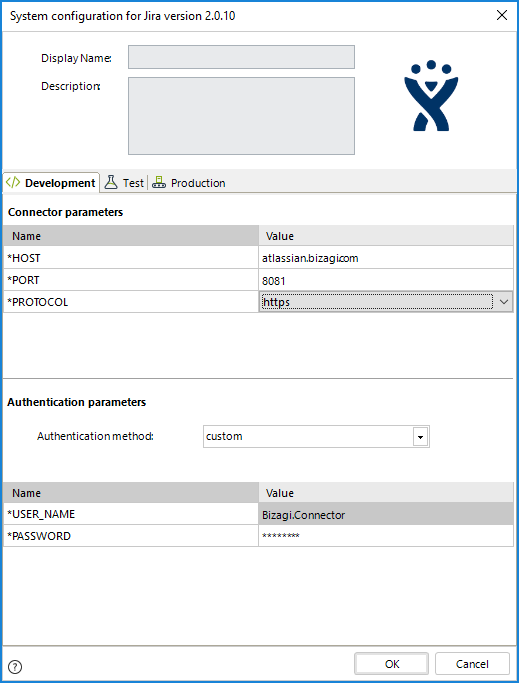
For this configuration, consider the following authentication parameters:
•Authentication method: Custom.
•HOST: Host URL of your Jira. It usually is atlassian.[your-company].com.
•PORT: Port assigned to your Jira. By default, it is 8081.
•PROTOCOL: It is "https" if you have a secure connection with Jira. If not use "http".
•USER_NAME: User name used to access Jira. This username will be used by default unless otherwise specified.
•PASSWORD: Password used by the username provided in the previous field.
Using the Connector
This connector features a set of methods which lets you use Jira's API services to take advantage of their capabilities.
To learn how/where to configure the use of a connector, refer to the Using connectors documentation.
When using the connector, keep in mind the following details for the available methods.
Create New Issue
This action creates a new issue on a project with project_id and issueType id.
To configure its inputs, take into account the following descriptions:
•username: Username of the user. This is optional and should be used if you want to make a request using different credentials instead of the global ones.
•password: password of the username provided in the previous field.
•project_id (Required): project id where the issue is going to be created.
•issueype_id (Required): id of the issue type. For example, a Task type code is 10101.
•summary (Required): summary of the issue.
•priority: priority id of the issue.
•assignee: Name of the user to be assigned.
To configure the outputs of this action, you can map the output object to the corresponding entity in Bizagi and make sure you map the attributes of the entity appropriately.
For more information about this method's use, refer to Jira 's official documentation at https://developer.atlassian.com/cloud/jira/platform/rest/#api-api-2-issue-post.
Create New Issue with Project Key
This action creates a new issue on a project with project key and issueType name.
To configure its inputs, take into account the following descriptions:
•username: Username of the user. This is optional and should be used if you want to make a request using different credentials instead of the global ones.
•password: password of the username provided in the previous field.
•project_id (Required): project id where the issue is going to be created.
•issueype_id (Required): id of the issue type. For example, a Task type code is 10101
•summary (Required): summary of the issue.
•priority: priority id of the issue.
•assignee: Name of the user to be assigned.
To configure the outputs of this action, you can map the output object to the corresponding entity in Bizagi and make sure you map the attributes of the entity appropriately.
For more information about this method's use, refer to Jira 's official documentation at https://developer.atlassian.com/cloud/jira/platform/rest/#api-api-2-issue-post.
Get Issue
This action gets a specific issue.
To configure its inputs, take into account the following descriptions:
•username: Username of the user. This is optional and should be used if you want to make a request using different credentials instead of the global ones.
•password: password of the username provided in the previous field.
•issue_key (Required): issue key of the issue.
To configure the outputs of this action, you can map the output object to the corresponding entity in Bizagi and make sure you map the attributes of the entity appropriately.
For more information about this method's use, refer to Jira 's official documentation at https://developer.atlassian.com/cloud/jira/platform/rest/#api-api-2-issue-issueIdOrKey-get.
Update Issue
This action updates a specific issue.
To configure its inputs, take into account the following descriptions:
•username: Username of the user. This is optional and should be used if you want to make a request using different credentials instead of the global ones.
•password: password of the username provided in the previous field.
•issue_key (Required): issue key of the issue.
•issueype_id (Required): id of the issue type. For example, a Task type code is 10101.
•summary (Required): summary of the issue.
•priority: priority id of the issue.
•assignee: Name of the user to be assigned.
To configure the outputs of this action, you can map the output object to the corresponding entity in Bizagi and make sure you map the attributes of the entity appropriately.
For more information about this method's use, refer to Jira 's official documentation at https://developer.atlassian.com/cloud/jira/platform/rest/#api-api-2-issue-issueIdOrKey-put.
Delete Issue
This action deletes a specific issue.
To configure its inputs, take into account the following descriptions:
•username: Username of the user. This is optional and should be used if you want to make a request using different credentials instead of the global ones.
•password: password of the username provided in the previous field.
•issue_key (Required): issue key of the issue.
To configure the outputs of this action, you can map the output object to the corresponding entity in Bizagi and make sure you map the attributes of the entity appropriately.
For more information about this method's use, refer to Jira 's official documentation at https://developer.atlassian.com/cloud/jira/platform/rest/#api-api-2-issue-issueIdOrKey-delete.
Add Attachment To Issue
This action adds an attachment to a specific issue.
To configure its inputs, take into account the following descriptions:
•username: Username of the user. This is optional and should be used if you want to make a request using different credentials instead of the global ones.
•password: password of the username provided in the previous field.
•issue_key (Required): issue key of the issue.
•filename (Required): filename of the attachment.
•file (Required): data of the attachment in base64
To configure the outputs of this action, you can map the output object to the corresponding entity in Bizagi and make sure you map the attributes of the entity appropriately.
For more information about this method's use, refer to Jira 's official documentation at https://developer.atlassian.com/cloud/jira/platform/rest/#api-api-2-issue-issueIdOrKey-attachments-post.
Get Comment of an Issue
This action gets the comments of a specific issue.
To configure its inputs, take into account the following descriptions:
•username: Username of the user. This is optional and should be used if you want to make a request using different credentials instead of the global ones.
•password: password of the username provided in the previous field.
•issue_key (Required): issue key of the issue.
To configure the outputs of this action, you can map the output object to the corresponding entity in Bizagi and make sure you map the attributes of the entity appropriately.
For more information about this method's use, refer to Jira 's official documentation at https://developer.atlassian.com/cloud/jira/platform/rest/#api-api-2-issue-issueIdOrKey-comment-get.
Add Comment to an Issue
This action adds a comment to a specific issue.
To configure its inputs, take into account the following descriptions:
•username: Username of the user. This is optional and should be used if you want to make a request using different credentials instead of the global ones.
•password: password of the username provided in the previous field.
•issue_key (Required): issue key of the issue.
•body (Required): body of the comment.
To configure the outputs of this action, you can map the output object to the corresponding entity in Bizagi and make sure you map the attributes of the entity appropriately.
For more information about this method's use, refer to Jira 's official documentation at https://developer.atlassian.com/cloud/jira/platform/rest/#api-api-2-issue-issueIdOrKey-comment-post.
Update Comment of an Issue
This action updates a specific comment.
To configure its inputs, take into account the following descriptions:
•username: Username of the user. This is optional and should be used if you want to make a request using different credentials instead of the global ones.
•password: password of the username provided in the previous field.
•issue_key (Required): issue key of the issue.
•body (Required): body of the comment.
•comment_id (Required): id of the comment.
To configure the outputs of this action, you can map the output object to the corresponding entity in Bizagi and make sure you map the attributes of the entity appropriately.
For more information about this method's use, refer to Jira 's official documentation at https://developer.atlassian.com/cloud/jira/platform/rest/#api-api-2-issue-issueIdOrKey-comment-id-put.
Delete Comment of an Issue
This action deletes a specific comment.
To configure its inputs, take into account the following descriptions:
•username: Username of the user. This is optional and should be used if you want to make a request using different credentials instead of the global ones.
•password: password of the username provided in the previous field.
•issue_key (Required): issue key of the issue.
•comment_id (Required): id of the comment.
To configure the outputs of this action, you can map the output object to the corresponding entity in Bizagi and make sure you map the attributes of the entity appropriately.
For more information about this method's use, refer to Jira 's official documentation at https://developer.atlassian.com/cloud/jira/platform/rest/#api-api-2-issue-issueIdOrKey-comment-id-delete.
Get Priorities
This action gets the priorities of Jira.
To configure its inputs, take into account the following descriptions:
•username: Username of the user. This is optional and should be used if you want to make a request using different credentials instead of the global ones.
•password: password of the username provided in the previous field.
To configure the outputs of this action, you can map the output object to the corresponding entity in Bizagi and make sure you map the attributes of the entity appropriately.
For more information about this method's use, refer to Jira 's official documentation at https://developer.atlassian.com/cloud/jira/platform/rest/#api-api-2-priority-get.
Add Worklog
This action adds a worklog to a specific issue.
To configure its inputs, take into account the following descriptions:
•username: Username of the user. This is optional and should be used if you want to make a request using different credentials instead of the global ones.
•password: password of the username provided in the previous field.
•issue_key (Required): issue key of the issue.
•timeSpent (Required): time spent in the Worklog. For example, "10s" (ten seconds), "1w" (one week), "7m" (seven minutes).
•comment: comment of the worklog.
To configure the outputs of this action, you can map the output object to the corresponding entity in Bizagi and make sure you map the attributes of the entity appropriately.
For more information about this method's use, refer to Jira 's official documentation at https://developer.atlassian.com/cloud/jira/platform/rest/#api-api-2-issue-issueIdOrKey-worklog-post.
Get Worklog
This action gets a specific worklog of an issue.
To configure its inputs, take into account the following descriptions:
•username: Username of the user. This is optional and should be used if you want to make a request using different credentials instead of the global ones.
•password: password of the username provided in the previous field.
•issue_key (Required): issue key of the issue.
•worklog_id (Required): id of the worklog.
To configure the outputs of this action, you can map the output object to the corresponding entity in Bizagi and make sure you map the attributes of the entity appropriately.
For more information about this method's use, refer to Jira 's official documentation at https://developer.atlassian.com/cloud/jira/platform/rest/#api-api-2-issue-issueIdOrKey-worklog-id-get.
Update Worklog
This action updates a specific worklog.
To configure its inputs, take into account the following descriptions:
•username: Username of the user. This is optional and should be used if you want to make a request using different credentials instead of the global ones.
•password: password of the username provided in the previous field.
•issue_key (Required): issue key of the issue.
•timeSpent (Required): time spent in the Worklog. For example, "10s" (ten seconds), "1w" (one week), "7m" (seven minutes).
•comment: comment of the worklog.
•worklog_id (Required): id of the worklog.
To configure the outputs of this action, you can map the output object to the corresponding entity in Bizagi and make sure you map the attributes of the entity appropriately.
For more information about this method's use, refer to Jira 's official documentation at https://developer.atlassian.com/cloud/jira/platform/rest/#api-api-2-issue-issueIdOrKey-worklog-id-put.
Delete Worklog
This action deletes a specific worklog.
To configure its inputs, take into account the following descriptions:
•username: Username of the user. This is optional and should be used if you want to make a request using different credentials instead of the global ones.
•password: password of the username provided in the previous field.
•issue_key (Required): issue key of the issue.
•worklog_id (Required): id of the worklog.
To configure the outputs of this action, you can map the output object to the corresponding entity in Bizagi and make sure you map the attributes of the entity appropriately.
For more information about this method's use, refer to Jira 's official documentation at https://developer.atlassian.com/cloud/jira/platform/rest/#api-api-2-issue-issueIdOrKey-worklog-id-delete.
Get All Projects
This action gets all the projects.
To configure its inputs, take into account the following descriptions:
•username: Username of the user. This is optional and should be used if you want to make a request using different credentials instead of the global ones.
•password: password of the username provided in the previous field.
To configure the outputs of this action, you can map the output object to the corresponding entity in Bizagi and make sure you map the attributes of the entity appropriately.
For more information about this method's use, refer to Jira 's official documentation at https://developer.atlassian.com/cloud/jira/platform/rest/#api-api-2-project-get.
Get Project
This action gets a specific project.
To configure its inputs, take into account the following descriptions:
•username: Username of the user. This is optional and should be used if you want to make a request using different credentials instead of the global ones.
•password: password of the username provided in the previous field.
•project_id (Required): id of the project.
To configure the outputs of this action, you can map the output object to the corresponding entity in Bizagi and make sure you map the attributes of the entity appropriately.
For more information about this method's use, refer to Jira 's official documentation at https://developer.atlassian.com/cloud/jira/platform/rest/#api-api-2-project-projectIdOrKey-get.
Last Updated 12/12/2025 4:10:31 PM