Overview
According to contractual definitions, when a customer enters the offboarding process, they have 15 calendar days to retrieve any information they require from their Modeler and Studio subscriptions.
Bizagi will not provide a consolidated package of this information. Instead, it is the customer’s responsibility to download or copy all necessary data to another repository before the subscription is permanently deleted.
Downloading models from Modeler
To download all models locally, click Save As in the File tab located in the upper-left corner.
Select This PC.
This action saves the model on your computer along with its attachment files.

Important considerations
Certain cloud components will not be stored locally when saving a model. Below is the list of objects that will not be included:
•Objects
•Process Revision
•Value Chain Diagrams
•Value Chain revisions
•Comments
•Folders
•Cloud attachments
•Activity Steam
•Process acceptance (Compliance)
When saving a cloud model locally, cloud attachments are downloaded to an automatically created local folder. These files are often referenced within the model as Linked Files (extended attributes).
However, if a Linked File uses a Path instead of being a Cloud Attachment, the path may not function correctly after saving the model locally.
Downloading models from Studio
To download all models locally:
Go to the first step of the Process Wizard and open the diagram you want to download.
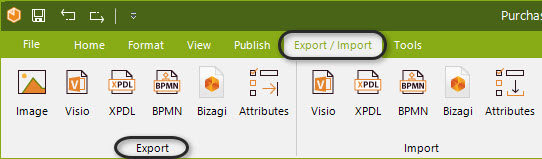
On the Modeler ribbon in Studio, click Export and choose the desired file type:
•Microsoft Visio: Export diagrams to Visio 2003, 2007, or 2010.
•Image Files: Export diagrams to PNG, BMP, SVG, or JPG formats.
•XPDL: Export diagrams to XPDL 2.1 format.
•BPMN: Export diagrams to BPMN 2.0 XML format.
•Bizagi: Download a .bpm file that can be opened in the free Bizagi Modeler.
If you need to download other resources such as business rules or definitions, we recommend opening each object individually and copying the content into Word, Excel, or a TXT file.
Last Updated 12/4/2025 3:23:09 PM