Overview
Bizagi can authenticate users through a variety of corporate Identity Providers (IdPs), such as Entra ID, ADFS, Okta, PingFederate, NetIQ, or SiteMinder. When you sign in using one of these providers, Bizagi uses the identity information sent by the IdP to validate who you are and determine how to grant you access to the Work Portal.
With Just-in-Time (JIT) provisioning, Bizagi can create your user account the moment you authenticate, as long as you do not already exist in the system. This means you can enter the Work Portal right away without requiring any prior registration, import, or manual account setup. The entire experience is designed to be seamless, allowing you to focus on accessing your work instead of worrying about whether your account was prepared in advance.
How it works
When you use your corporate account to sign in, the authentication process begins at the Bizagi login endpoint but is immediately handed off to your organization's IdP. This ensures that your credentials are only handled by the system your organization trusts. After you complete the authentication on the IdP login page, Bizagi receives your validated identity information and continues the process internally.
Bizagi uses the identity attributes provided by the IdP (such as your username, domain, and email) to determine whether your user profile already exists. If it does, you simply enter the Work Portal. If it does not, and JIT provisioning is enabled, Bizagi creates your profile on the spot, making it active, enabled, and ready for task assignment.
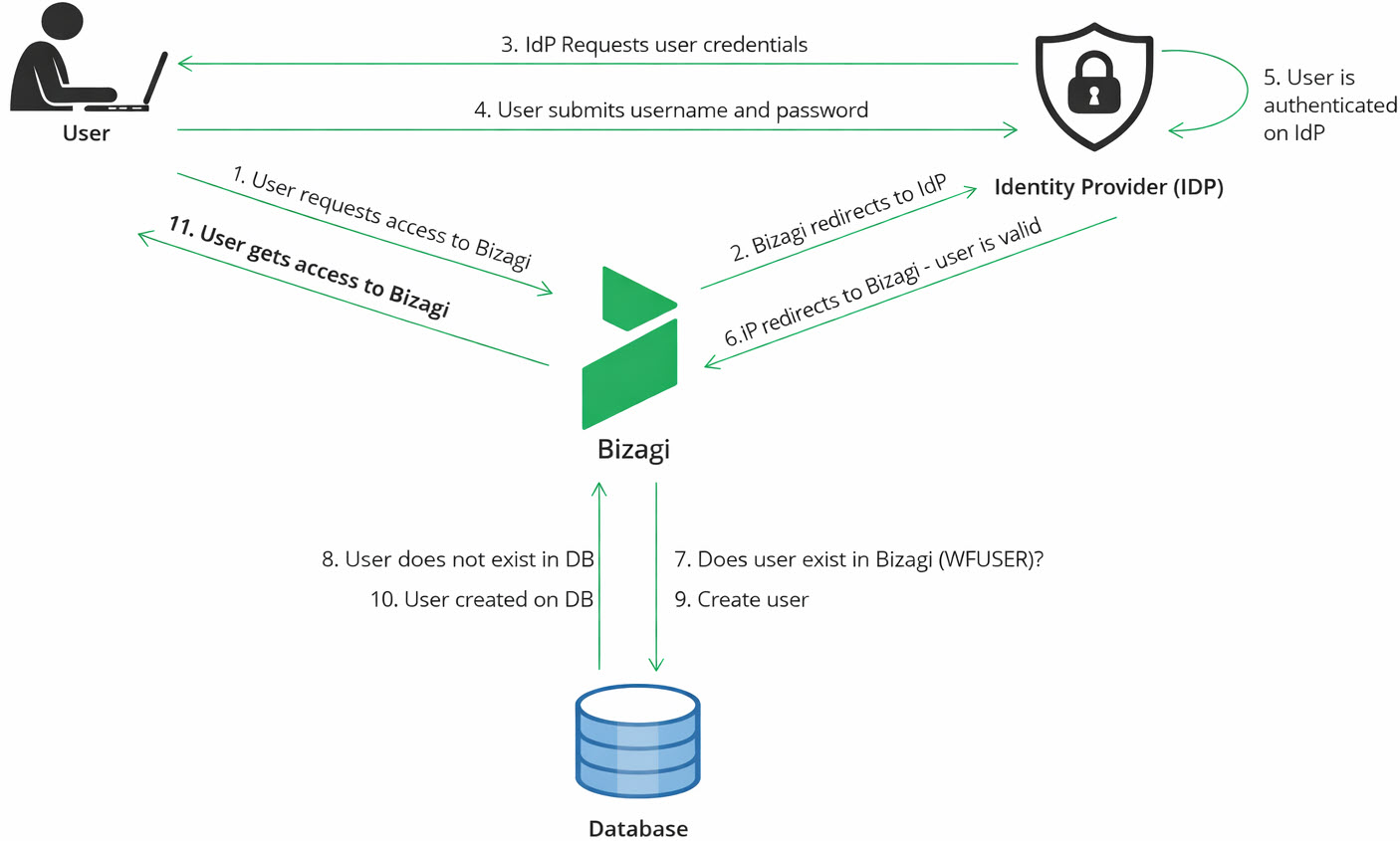
To give you a better sense of the information flow, here is what Bizagi receives and how it uses it:
•Username and domain: Always taken from the claims returned by your IdP.
•Email: Included if the IdP provides it. Bizagi reads it from the OAuth2 token (email) or the SAML assertion (attributes ending in email or emailaddress).
•Default Roles: Assigned only if they are defined in the RolesForAutoProvisionedUsers property.
Once your account is created, Bizagi registers the action in the authentication logs using:
•Event type: Login
•Sub‑event type: Auto‑provisioned user
This provides traceability of when your account was created and confirms that it occurred during a valid authentication.
Supported authentication methods
JIT provisioning works only with authentication mechanisms that provide the identity attributes Bizagi needs to create your account. This process applies only the first time you accesses the Work Portal. After the initial sign‑in, JIT provisioning does not update user information, nor does it deactivate accounts. Subsequent logins simply authenticate the existing user without modifying the profile.
These authentication mechanisms ensure that Bizagi receives secure and validated identity information directly from your IdP.
SAML 2.0 Authentication
If your organization uses SAML 2.0 for authentication, Bizagi can create your account automatically based on the assertion received from the IdP. Several platforms operate under SAML 2.0, including:
•Entra ID
•ADFS
•Okta
•PingFederate
•NetIQ
•SiteMinder
In these cases, Bizagi extracts your identity attributes directly from the SAML assertion returned after the IdP confirms your identity.
OAuth2 Authentication
Bizagi also supports JIT provisioning when your organization uses OAuth2. The user identity is returned to Bizagi inside a secure token that includes claims such as your user identifier and, when available, your email. OAuth2 is used by:
•Azure AD
•ADFS4
As long as the IdP includes the necessary identity fields, Bizagi can create your account automatically during the login process.
Information used to create your account
Bizagi creates your account using only the information sent by your organization’s IdP. This ensures your Bizagi profile matches the information your company manages centrally.
In many standard SAML 2.0 configurations, the IdP sends a single attribute called the UPN (User Principal Name). It usually looks like an email address, for example: john.doe@bizagi.com
Based on that UPN, Bizagi creates your account with the following information:
•Username: The part before the @. Example: john.doe
•Domain: The part after the @. Example: bizagi.com
•Contact email: The full UPN, if the IdP does not send a separate email attribute. Example: john.doe@bizagi.com
•Full name: Not filled in by default. It stays empty unless the IdP sends this attribute.
•Active status: Always true. Auto‑provisioned accounts are created active so you can use Bizagi immediately.
If your organization has configured Bizagi to assign default roles, those roles are added automatically (as long as they already exist in Bizagi).
|
OAuth 2.0 authentication also works with JIT provisioning. The difference is that OAuth 2.0 IdPs may use different names for the user attributes they send (for example, email or preferred_username). Bizagi uses whatever identity information the IdP provides to build your account. |

How to enable JIT provisioning
This feature is disabled by default, and organizations activate it based on their access management policies.
The configuration is done by administrators in the Management Console (MC), specifically within the Environment option Custom Properties.
Administrators configure the following Properties:
•Required Property
AutoProvisionUsers = true
•Optional Property for default Roles
RolesForAutoProvisionedUsers = RoleName1,RoleName2,...
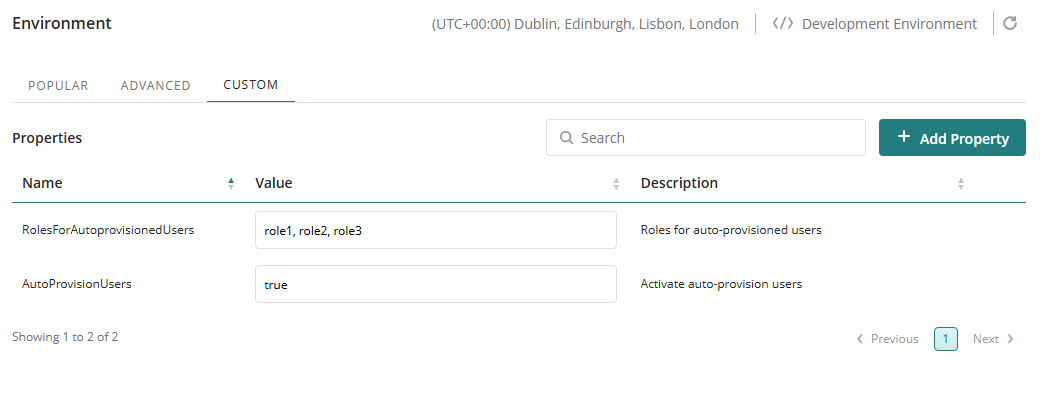
These properties allow Bizagi to create your account automatically and to assign any predetermined roles as soon as your identity is validated by the IdP.
Where your Bizagi account appears
Once your account is created, it becomes part of the Bizagi user base like any other. Administrators can view and manage your profile through Bizagi's User Management option. They may update your information, adjust your access, or assign additional roles as needed.
Bizagi also records your account creation in the authentication logs, allowing administrators to confirm exactly when your user profile was created and under what circumstances:
•Event type: Login
•Sub‑event type: Auto‑provisioned user
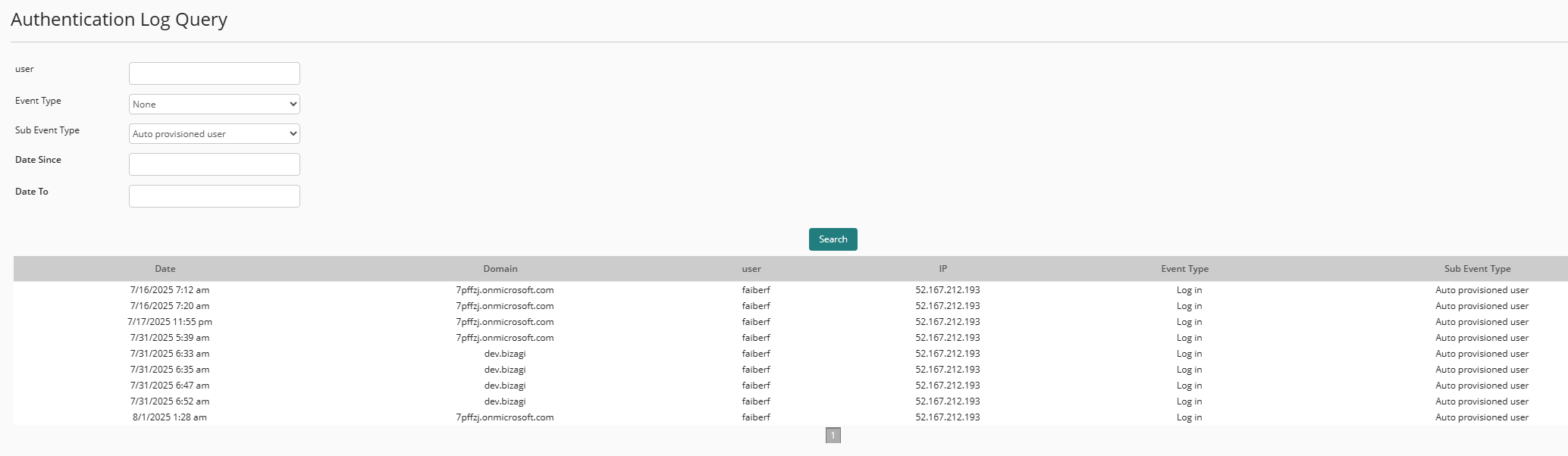
This traceability helps ensure transparency and provides a clear audit trail.
What you can expect when you sign in
As a user, accessing Bizagi with this feature enabled is simple and intuitive. When you open the Bizagi Work Portal URL, you are redirected to your organization's IdP, where you authenticate with your corporate credentials. As soon as your identity is validated, Bizagi receives your information and verifies whether your user account exists.
If you are a first‑time Bizagi user and JIT provisioning is enabled, your account is created at that instant. Bizagi then continues the login process normally and takes you to the Work Portal.
Everything is handled transparently, requiring no additional steps from you.
Last Updated 2/25/2026 4:27:42 PM