Overview
The Deployment Automation API allows you to export and import Bizagi deployment packages (.bex files) using REST endpoints instead of performing deployments manually through the Management Console (MC).
Using this API, you can integrate Bizagi deployments into automated workflows such as scripts, CI/CD pipelines, or API clients. All deployment operations run asynchronously. When a request is submitted, the API immediately returns an execution identifier that you can use to monitor progress until the operation completes.
How it works
The Deployment Automation API exposes endpoints to:
•Export a deployment package from a Development environment.
•Monitor the export execution and retrieve the download URL for the generated package.
•Import a deployment package into a Test or Production environment.
•Monitor the import execution status.
Each operation is executed asynchronously and tracked using an ExecutionId returned by the API.
Generating an API Key
Requests to the Deployment Automation API require an API Key.
To generate an API Key in the Management Console:
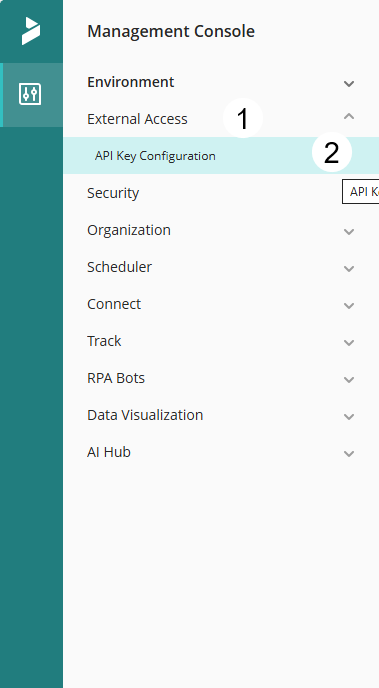
1.Expand the External Access drop down menu.
2.Select API Key Configuration.
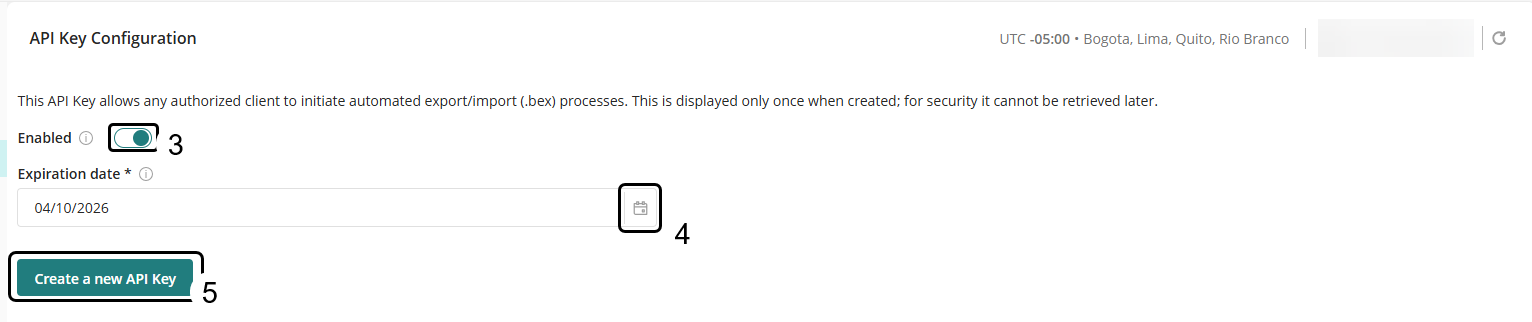
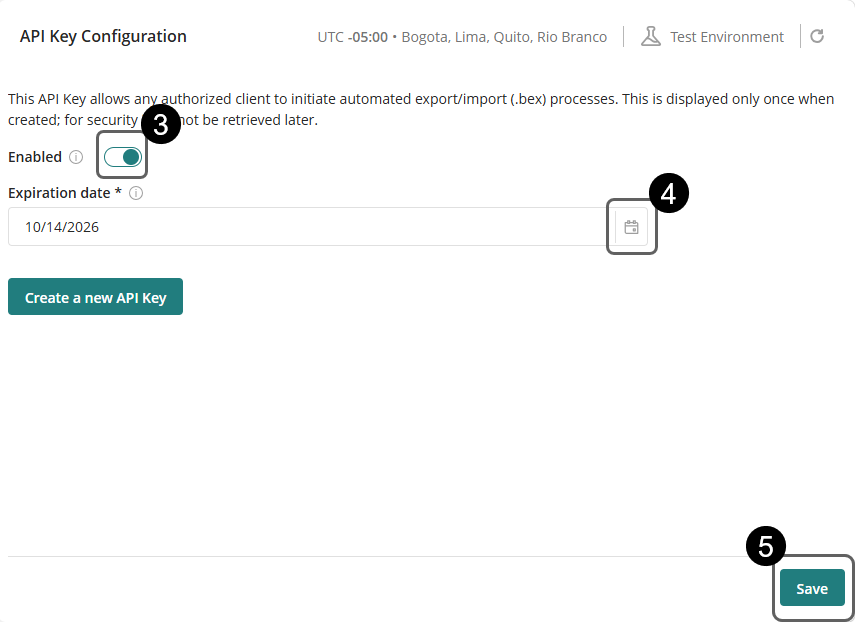
3.Enable the API Key using the Enabled toggle switch.
4.Click the calendar button to select the expiration date.
5.Click Create a new API Key.
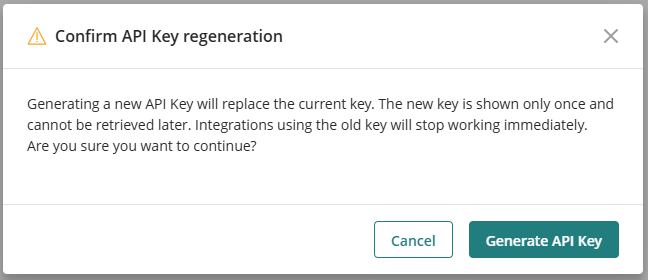
6.Confirm the action in the pop up window that appears.
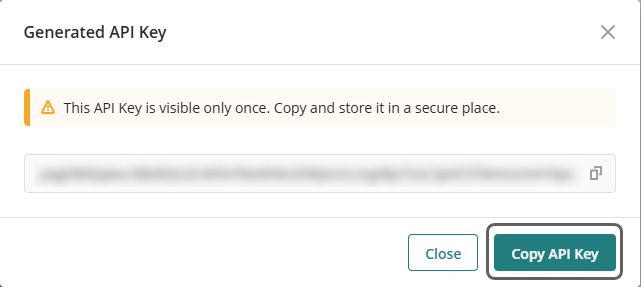
7.Copy the API Key.
|
The API Key is displayed once. We strongly recommend copying it and storing it securely. |

Modify an API Key
To modify the expiration date and enable or disable an existing API Key without generating a new API Key:
1.Expand the External Access drop down menu.
2.Select API Key Configuration.
3.Enable or Disable the API Key using the Enabled toggle switch.
4.Click the calendar button and select the expiration date.
5.Click Save.
Consuming the API
Exporting a deployment package
The Export endpoint generates a .bex deployment package in a Development environment.
Key characteristics
•Triggered using a POST request.
•Requires a JSON request body defining the content to export.
•Runs asynchronously.
•Returns an ExecutionId used to track progress.
Endpoint
POST /public/api/external/v1/deployment/Export
Headers
Authorization: Bearer <API_KEY>
Content-Type: application/json
Request Body
JSON object describing the deployment configuration.
•The FileName field is required.
•The Type field must be either Deployment or MicroDeployment.
Response
A successful request returns the parameter executionId, which uniquely identifies the export operation. Use this identifier to monitor the export process through the Export Status endpoint.
The response can generate the following messages:
HTTP Status Code |
Description |
202 Accepted |
The request was accepted and the process started successfully. |
400 Invalid request |
Missing FileName, unsupported Type, or export not allowed in this environment |
409 Export already in progress |
Export already in progress. |
500 Internal server error |
An unexpected error occurred while processing the request. |
|
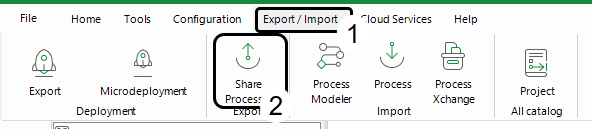
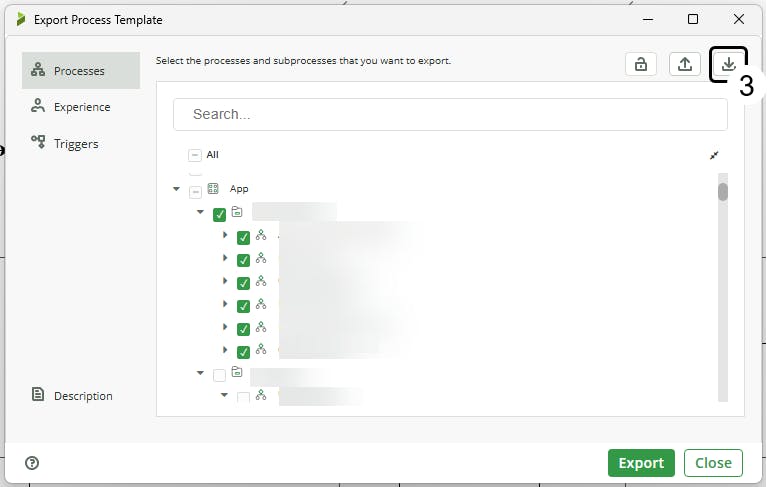
Before calling the API, use Bizagi Studio to obtain the JSON file by following these steps:
1.Go to the Export/Import menu. 2.Select Export in the Deployment section.
3.Configure the export settings by selecting the components you want to include, then click the Download button.
The file content can be used directly as the request body for automated exports. |
Example:
Request |
Response |
Notes |
{ |
{
|
When the request is received, Bizagi validates the data and verifies that no other export operation is currently running. If validation succeeds, the export starts asynchronously. |
|
•The parameter Password is optional; however, if it is defined for a request, the same value must be used for the deployment package import. •The parameter IncludeSuffix is optional. If defined with the value true, a timestamp is appended to the exported file name using the format {FileName}_{dd-MM-yyyy-HH-mm-ss}.bex. If the parameter is set to false or is not included in the request, the file is exported with its original name. |
Use the returned ExecutionId to monitor the export execution.
Monitoring export execution and retrieving the package
The ExportStatus endpoint checks the current state of the export and, once finished, obtains the download URL for the .bex file.
Endpoint
GET /public/api/external/v1/deployment/ExportStatus/{executionId}
Headers
Authorization: Bearer <API_KEY>
Request body
Not required.
Export states
The Export operation can return the following states:
•Started: Request accepted.
•Running: Export in progress.
•Done: Export completed successfully.
•Error: Export failed.
While the status is Started or Running, continue polling the endpoint until the status changes.
Response
Returns the current status of the export operation. When the export completes successfully, the response includes a SAS URL that can be used to download the generated deployment package. As shown in the following response example:
{
"Status": "Done",
"SasUrlToken": "https://storage...MyDeployment.bex?...",
"ExpiryTime": "2024-01-15T11:40:00Z"
}
Where:
•status: Current status of the export operation.
•sasUrlToken: Temporary URL used to download the generated deployment package. Available only when the export operation completes successfully.
•expiryTime: Date and time when the SAS URL expires.
The response can generate the following messages:
HTTP Status Code |
Description |
202 Accepted |
The request was accepted and the process started successfully. |
400 Invalid request |
Invalid ExecutionId or operation not allowed in this environment. |
500 Internal server error |
An unexpected error occurred while processing the request. |
|
The SasUrlToken is a temporary download URL that expires automatically. The .bex file is downloaded when the URL is accessed. This URL is used during the Import step. |
Importing a deployment package
The Import endpoint applies a previously generated .bex package to a Test or Production environment.
Key characteristics
•Triggered using a POST request.
•Requires a JSON request body.
•Uses the SAS URL generated during export.
•Runs asynchronously.
•Returns a new ExecutionId.
Endpoint
POST /public/api/external/v1/deployment/Import
Headers
Authorization: Bearer <API_KEY>
Content-Type: application/json
Request body
JSON object containing the SAS URL and a password that can be optional or required if defined during the deployment package export.
Response
A successful request returns the executionId parameter that uniquely identifies the import operation. Use this identifier to monitor the import process through the Import Status endpoint.
The response can generate the following messages:
HTTP Status Code |
Description |
202 Accepted |
The request was accepted and the process started successfully. |
400 Invalid request |
Missing SasUrlToken, unsupported Type, import in progress, or not allowed in this environment. |
500 Internal server error |
An unexpected error occurred while processing the request. |
Example:
Request |
Response |
Note |
{ |
{ |
When the request is submitted, Bizagi downloads the .bex file using the provided URL, validates the package, and starts the deployment asynchronously. |
|
The continueOnMaintenanceWindow parameter is optional. If provided, it must contain a valid Boolean value (true or false). When this parameter is set to false, imports that require a maintenance window are rejected with an error. If the parameter is omitted, the import process follows the default maintenance window handling behavior. |
Monitoring import execution
The ImportStatus endpoint allows you to monitor the progress of an import operation until it completes or fails.
Endpoint
GET /public/api/external/v1/deployment/ImportStatus/{executionId}
Headers
Authorization: Bearer <API_KEY>
Response
Returns the current status of the import operation. As shown in the following response example:
{
"status": "Done",
"message": "Import completed successfully"
}
Where:
•status: Current status of the import operation.
•message: Additional information about the execution result.
The response can generate the following messages:
HTTP Status Code |
Description |
202 Accepted |
The request was accepted and the process started successfully. |
404 Not Found |
Import execution not found or was cancelled. |
500 Internal server error |
An unexpected error occurred while processing the request. |
Import states
The Import operation can return the following states:
•Started: Request accepted.
•Running: Deployment in progress.
•Done: Deployment completed successfully.
•Error: Deployment failed. If the deployment fails, the response includes a message explaining the reason.
Interacting with the API using an external tool
When using an API client (such as Bruno):
1.Create a request using the appropriate HTTP method and endpoint URL.
2.Add the request body for your Import or Export operation.
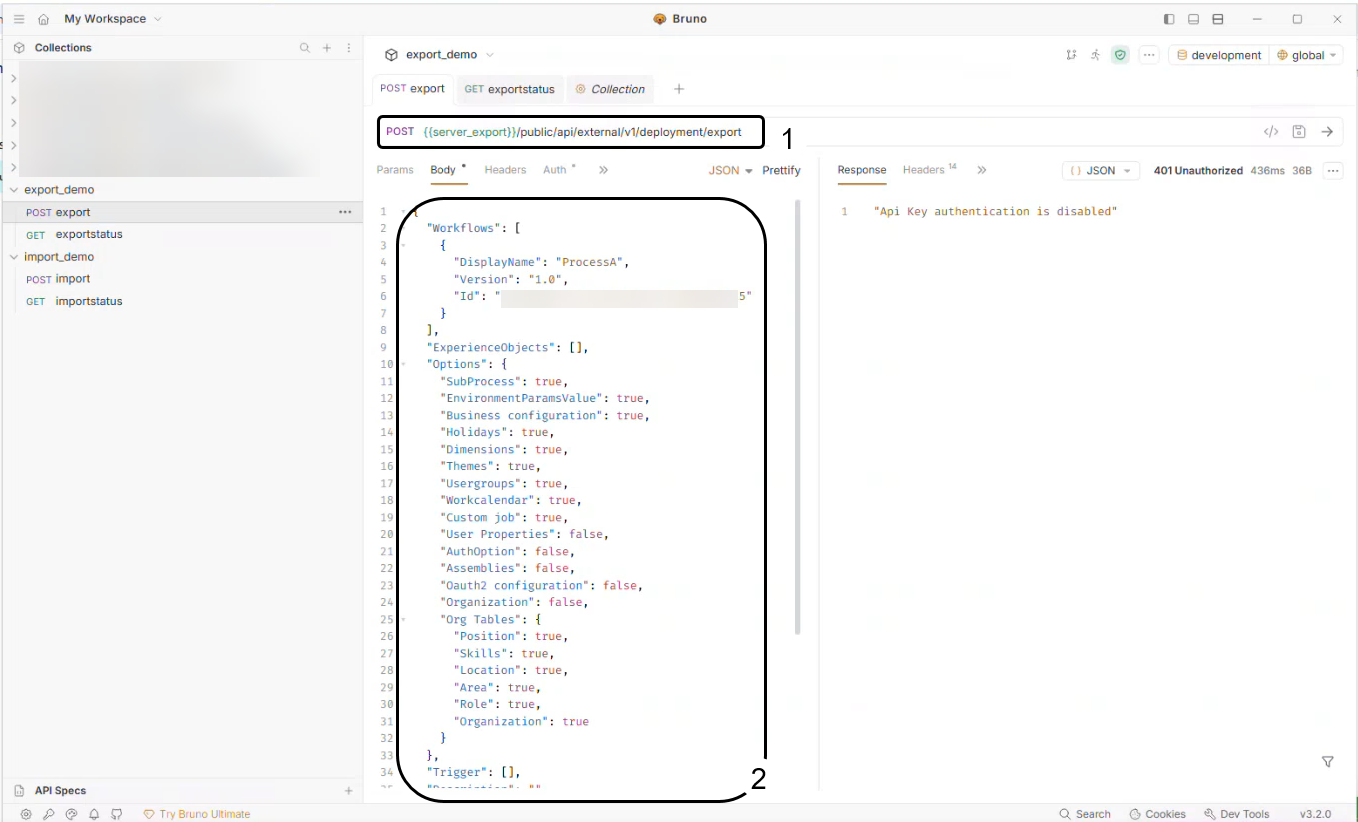
3.Add the Authorization header with your API Key.
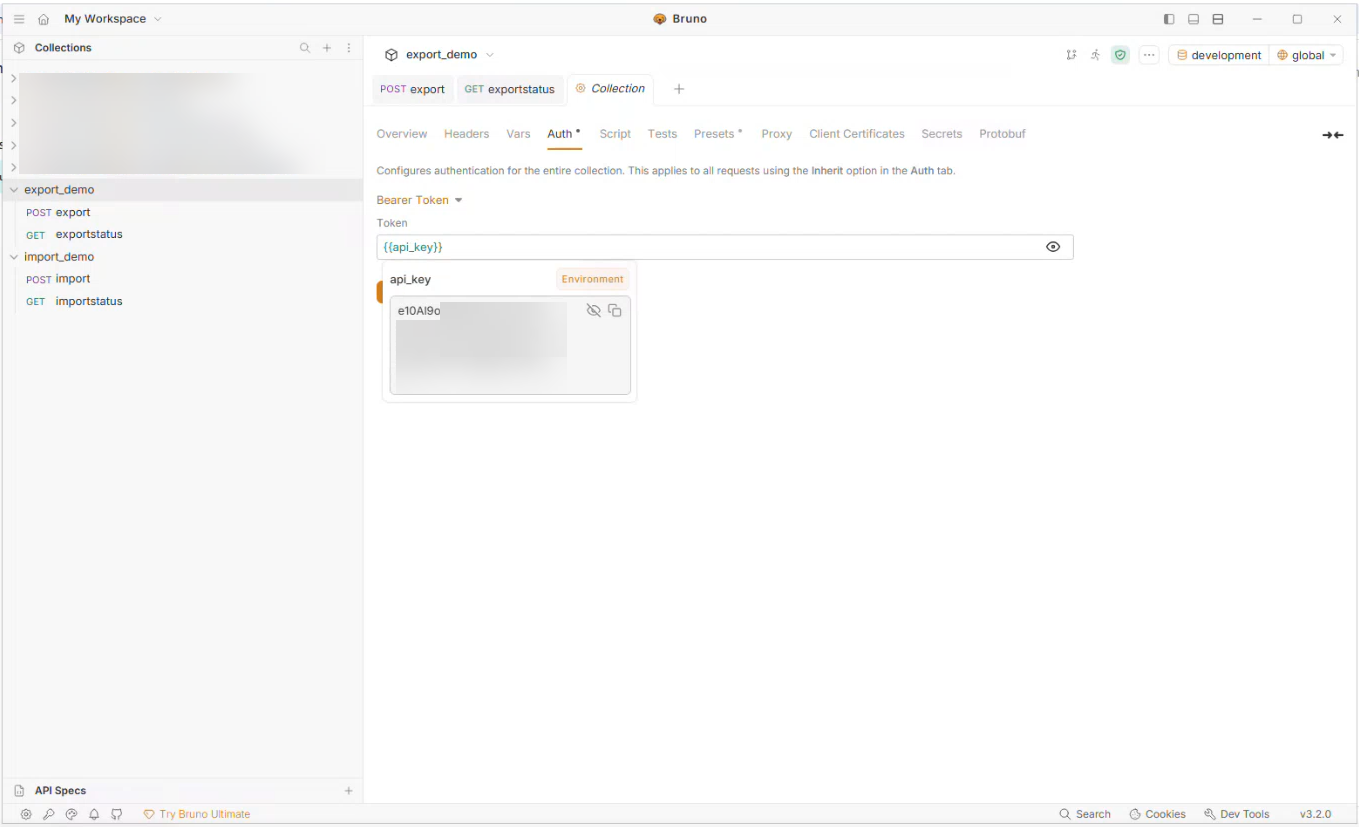
4.Send the request to obtain the ExecutionId.
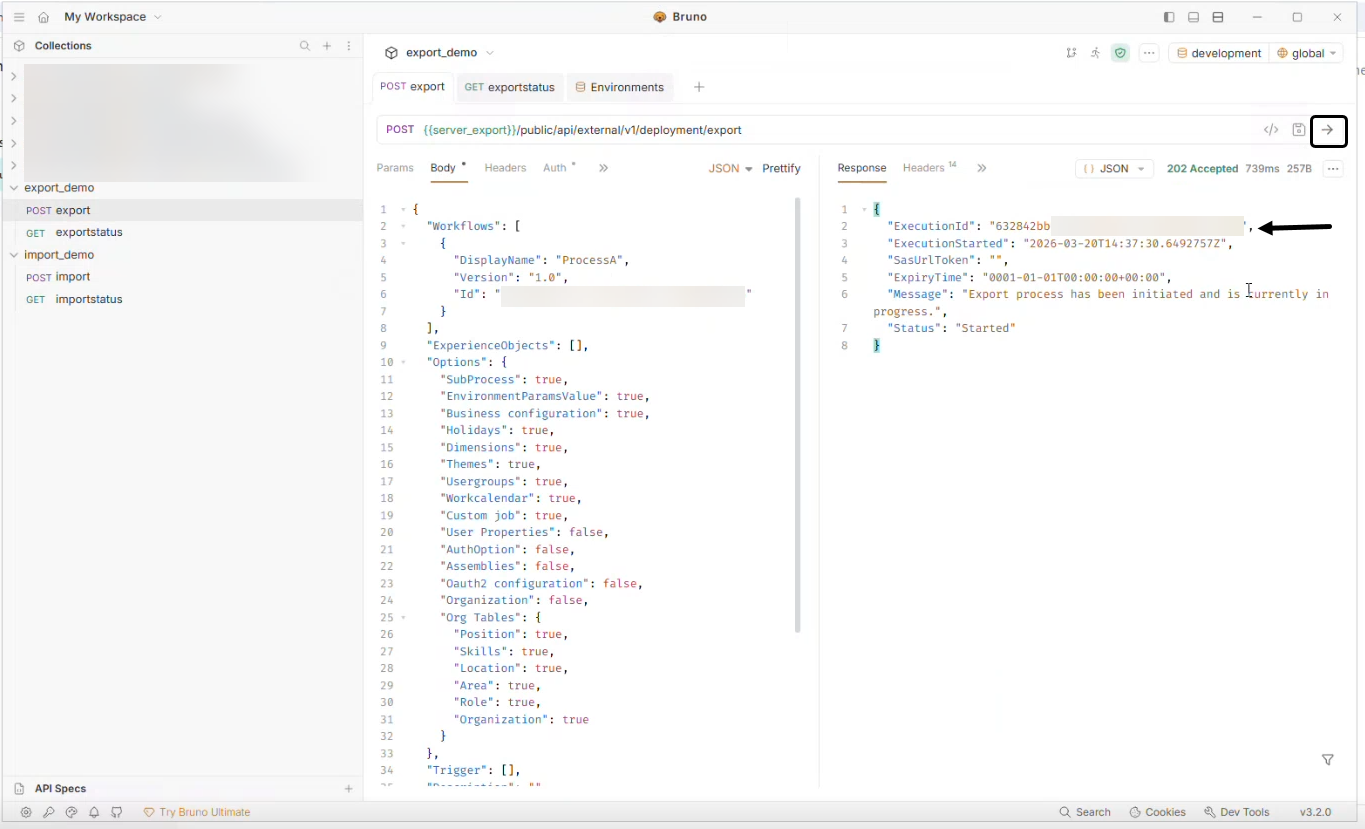
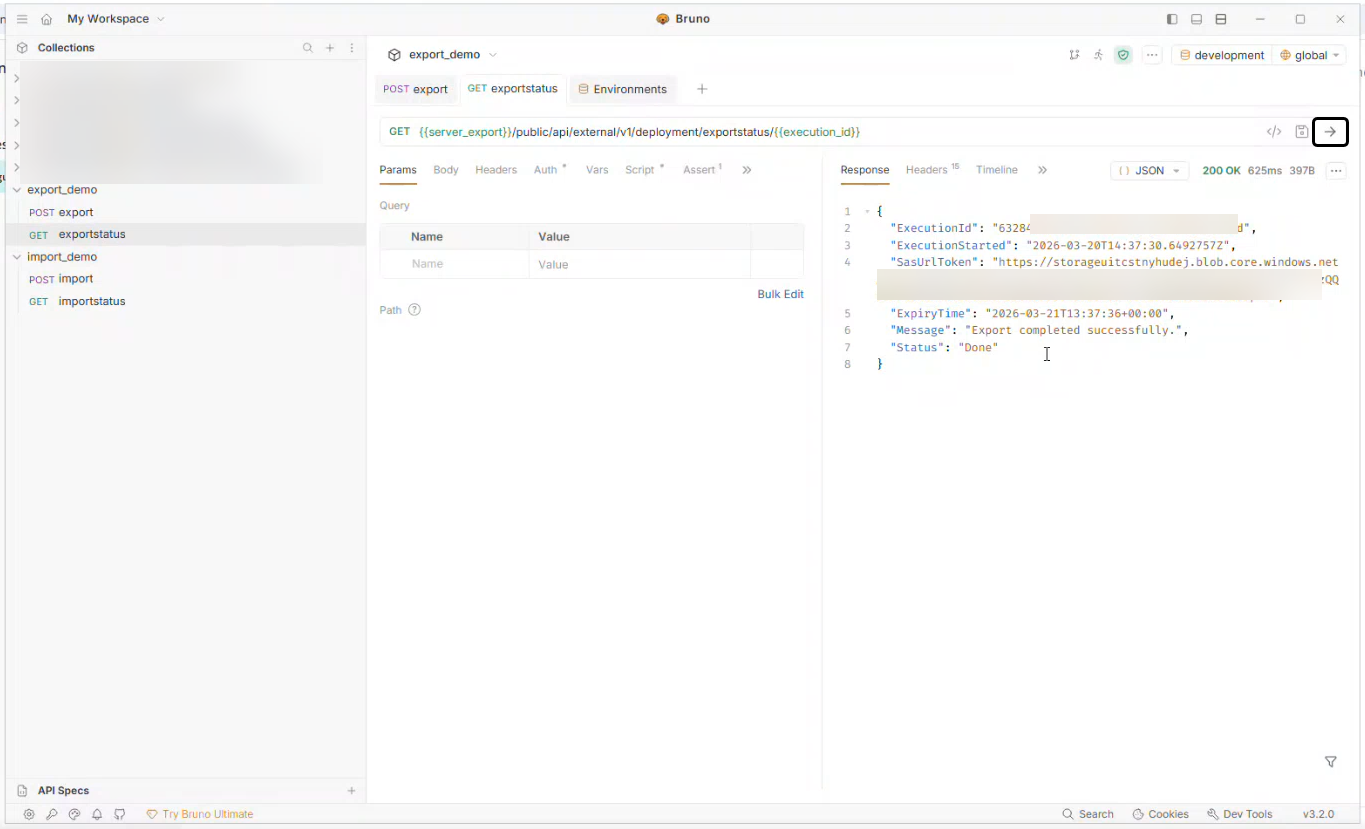
5.Create a second request (ExportStatus or ImportStatus) to poll the execution progress.
6.Pass the ExecutionId as a path parameter.

7.Send the request.
Automation examples
The following examples show how the Deployment Automation API can be used as part of automated workflows, such as scripts or CI/CD pipelines.
These examples are provided for reference purposes. For more technical detail, go to the following URL: https://{mcw-host}/public/swagger/ui/index.
PowerShell
# Configuration
$devApiKey = $env:BIZAGI_DEV_API_KEY
$testApiKey = $env:BIZAGI_TEST_API_KEY
$devBaseUrl = "https://manage-dev.mybizagi.com/public/api/external/v1/deployment"
$testBaseUrl = "https://manage-test.mybizagi.com/public/api/external/v1/deployment"
# Headers
$devHeaders = @{
"Authorization" = "Bearer $devApiKey"
"Content-Type" = "application/json"
}
$testHeaders = @{
"Authorization" = "Bearer $testApiKey"
"Content-Type" = "application/json"
}
# 1. Start Export
Write-Host "Starting export..."
$exportConfig = Get-Content -Path "export-config.json" -Raw
$exportResponse = Invoke-RestMethod -Uri "$devBaseUrl/Export" -Method Post -Headers $devHeaders -Body $exportConfig
$exportExecutionId = $exportResponse.ExecutionId
Write-Host "Export started. ExecutionId: $exportExecutionId"
# 2. Monitor Export
do {
Start-Sleep -Seconds 5
$exportStatus = Invoke-RestMethod -Uri "$devBaseUrl/ExportStatus/$exportExecutionId" -Method Get -Headers $devHeaders
Write-Host "Export status: $($exportStatus.Status) - $($exportStatus.Message)"
} while ($exportStatus.Status -eq "Started" -or $exportStatus.Status -eq "Running")
if ($exportStatus.Status -ne "Done") {
Write-Error "Export failed: $($exportStatus.Message)"
exit 1
}
$sasUrl = $exportStatus.SasUrlToken
Write-Host "Export completed. SAS URL obtained."
# 3. Start Import
Write-Host "Starting import into Test environment..."
$importConfig = @{
SasUrlToken = $sasUrl
Password = "SecurePass123"
} | ConvertTo-Json
$importResponse = Invoke-RestMethod -Uri "$testBaseUrl/Import" -Method Post -Headers $testHeaders -Body $importConfig
$importExecutionId = $importResponse.ExecutionId
Write-Host "Import started. ExecutionId: $importExecutionId"
# 4. Monitor Import
do {
Start-Sleep -Seconds 10
$importStatus = Invoke-RestMethod -Uri "$testBaseUrl/ImportStatus/$importExecutionId" -Method Get -Headers $testHeaders
Write-Host "Import status: $($importStatus.Status) - $($importStatus.Message)"
} while ($importStatus.Status -eq "Started" -or $importStatus.Status -eq "Running")
if ($importStatus.Status -ne "Done") {
Write-Error "Import failed: $($importStatus.Message)"
exit 1
}
Write-Host "Automated deployment completed successfully!"
``
Python
import os
import time
import json
import requests
from typing import Optional
# Configuration
DEV_API_KEY = os.getenv('BIZAGI_DEV_API_KEY')
TEST_API_KEY = os.getenv('BIZAGI_TEST_API_KEY')
DEV_BASE_URL = 'https://manage-dev.mybizagi.com/public/api/external/v1/deployment'
TEST_BASE_URL = 'https://manage-test.mybizagi.com/public/api/external/v1/deployment'
def get_headers(api_key: str) -> dict:
return {
'Authorization': f'Bearer {api_key}',
'Content-Type': 'application/json'
}
def start_export(base_url: str, api_key: str, config: dict) -> str:
"""Starts an export operation and returns the ExecutionId"""
print('Starting export...')
response = requests.post(
f'{base_url}/Export',
headers=get_headers(api_key),
json=config
)
response.raise_for_status()
execution_id = response.json()['ExecutionId']
print(f'Export started. ExecutionId: {execution_id}')
return execution_id
def poll_export_status(base_url: str, api_key: str, execution_id: str) -> str:
"""Polls the export until completion and returns the SAS URL"""
while True:
time.sleep(5)
response = requests.get(
f'{base_url}/ExportStatus/{execution_id}',
headers=get_headers(api_key)
)
response.raise_for_status()
status = response.json()
print(f"Export status: {status['Status']} - {status['Message']}")
if status['Status'] == 'Done':
return status['SasUrlToken']
elif status['Status'] == 'Error':
raise Exception(f"Export failed: {status['Message']}")
def start_import(
base_url: str,
api_key: str,
sas_url: str,
password: Optional[str] = None
) -> str:
"""Starts an import operation and returns the ExecutionId"""
print('Starting import...')
config = {'SasUrlToken': sas_url}
if password:
config['Password'] = password
response = requests.post(
f'{base_url}/Import',
headers=get_headers(api_key),
json=config
)
response.raise_for_status()
execution_id = response.json()['ExecutionId']
print(f'Import started. ExecutionId: {execution_id}')
return execution_id
def poll_import_status(base_url: str, api_key: str, execution_id: str):
"""Polls the import until completion"""
while True:
time.sleep(10)
response = requests.get(
f'{base_url}/ImportStatus/{execution_id}',
headers=get_headers(api_key)
)
if response.status_code == 404:
raise Exception('Import execution not found')
response.raise_for_status()
status = response.json()
print(f"Import status: {status['Status']} - {status['Message']}")
if status['Status'] == 'Done':
return
elif status['Status'] == 'Error':
raise Exception(f"Import failed: {status['Message']}")
def main():
# 1. Load export configuration
with open('export-config.json', 'r') as f:
export_config = json.load(f)
# 2. Execute export
export_execution_id = start_export(
DEV_BASE_URL,
DEV_API_KEY,
export_config
)
sas_url = poll_export_status(
DEV_BASE_URL,
DEV_API_KEY,
export_execution_id
)
print('Export completed. SAS URL obtained.')
# 3. Execute import
import_execution_id = start_import(
TEST_BASE_URL,
TEST_API_KEY,
sas_url,
'SecurePass123'
)
poll_import_status(
TEST_BASE_URL,
TEST_API_KEY,
import_execution_id
)
print('Automated deployment completed successfully!')
if __name__ == '__main__':
main()
Bash (using curl)
#!/bin/bash
set -e
# Configuration
DEV_API_KEY="${BIZAGI_DEV_API_KEY}"
TEST_API_KEY="${BIZAGI_TEST_API_KEY}"
DEV_BASE_URL="https://manage-dev.mybizagi.com/public/api/external/v1/deployment"
TEST_BASE_URL="https://manage-test.mybizagi.com/public/api/external/v1/deployment"
# Function to start export
start_export() {
echo "Starting export..."
response=$(curl -s -X POST "${DEV_BASE_URL}/Export" \
-H "Authorization: Bearer ${DEV_API_KEY}" \
-H "Content-Type: application/json" \
-d @export-config.json)
execution_id=$(echo $response | jq -r '.ExecutionId')
echo "Export started. ExecutionId: ${execution_id}"
echo $execution_id
}
# Function to monitor export
wait_for_export() {
local execution_id=$1
local status="Started"
while [[ "$status" == "Started" || "$status" == "Running" ]]; do
sleep 5
response=$(curl -s -X GET "${DEV_BASE_URL}/ExportStatus/${execution_id}" \
-H "Authorization: Bearer ${DEV_API_KEY}")
status=$(echo $response | jq -r '.Status')
message=$(echo $response | jq -r '.Message')
echo "Export status: ${status} - ${message}"
done
if [[ "$status" != "Done" ]]; then
echo "Export failed: ${message}"
exit 1
fi
sas_url=$(echo $response | jq -r '.SasUrlToken')
echo $sas_url
}
# Function to start import
start_import() {
local sas_url=$1
echo "Starting import into Test environment..."
response=$(curl -s -X POST "${TEST_BASE_URL}/Import" \
-H "Authorization: Bearer ${TEST_API_KEY}" \
-H "Content-Type: application/json" \
-d "{\"SasUrlToken\": \"${sas_url}\", \"Password\": \"SecurePass123\"}")
execution_id=$(echo $response | jq -r '.ExecutionId')
echo "Import started. ExecutionId: ${execution_id}"
echo $execution_id
}
# Function to monitor import
wait_for_import() {
local execution_id=$1
local status="Started"
while [[ "$status" == "Started" || "$status" == "Running" ]]; do
sleep 10
response=$(curl -s -X GET "${TEST_BASE_URL}/ImportStatus/${execution_id}" \
-H "Authorization: Bearer ${TEST_API_KEY}")
status=$(echo $response | jq -r '.Status')
message=$(echo $response | jq -r '.Message')
echo "Import status: ${status} - ${message}"
done
if [[ "$status" != "Done" ]]; then
echo "Import failed: ${message}"
exit 1
fi
}
# Main script
main() {
# 1. Export
export_execution_id=$(start_export)
sas_url=$(wait_for_export "$export_execution_id")
echo "Export completed. SAS URL obtained."
# 2. Import
import_execution_id=$(start_import "$sas_url")
wait_for_import "$import_execution_id"
echo "Automated deployment completed successfully!"
}
main
CI/CD integration (Azure DevOps)
# azure-pipelines.yml
trigger:
branches:
include:
- main
variables:
# Variable group containing DEV_API_KEY and TEST_API_KEY
- group: bizagi-api-keys
stages:
- stage: Export
displayName: 'Export from Development'
jobs:
- job: ExportPackage
displayName: 'Export Deployment Package'
pool:
vmImage: 'ubuntu-latest'
steps:
- task: PowerShell@2
displayName: 'Export and Monitor'
inputs:
targetType: 'inline'
script: |
$headers = @{
Export configuration file (export-config.json)
{
"Workflows": [
{
"DisplayName": "MyProcess",
"Version": "1.0",
"Id": "4e2ce804-9c19-4e29-966c-142663906715"
}
],
"ExperienceObjects": [],
"Options": {
"SubProcess": true,
"EnvironmentParamsValue": true,
"Business configuration": true,
"Holidays": false,
"Dimensions": false,
"Themes": true,
"Usergroups": true,
"Workcalendar": true,
"Custom job": true,
"User Properties": false,
"AuthOption": false,
"Assemblies": false,
"Oauth2 configuration": false,
"Organization": false,
"Org Tables": {
"Position": false,
"Skills": false,
"Location": false,
"Area": false,
"Role": false,
"Organization": false
}
},
"Trigger": [],
"Description": "Automated deployment from CI/CD",
{
Considerations
•Only one Export and one Import operation can run at a time per environment.
•Download URLs must be accessed before their expiration time.
•Importing files from external public links is not allowed.
•Data synchronization is not included in the deployment process.
Last Updated 10/15/2026 12:34:02 PM