Overview
The following example shows how you can create C# code to invoke OData methods from an external system. Although there are different programming languages from which you can invoke OData, this example shows the steps you need to follow.
What you need to do
Keep in mind that OData is based on the OAuth 2.0 protocol. First, you need to register the external application in the Work Portal to obtain the keys. See the Quick start guide.
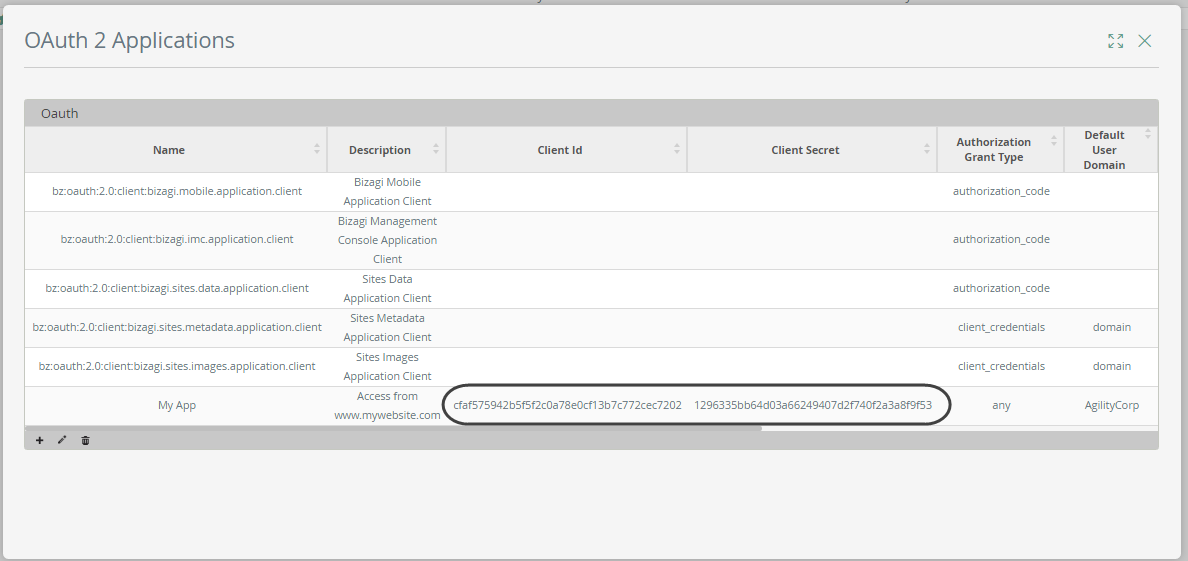
We recommend using the Client credentials access type and making sure that you select the API scope. Then you need to write the code. The steps to invoke an OData method are as follows:
2.Execute the method, depending on whether the method is GET or POST.
Obtain the access token
The first step is to obtain the OAuth 2.0 access token. We recommend creating a class with a constructor that contains the access token, making it easier to serialize and manipulate in the code.
Class with the OAuth response
public class OAuthResponse{
private string tokenType;
private string accessToken;
public string TokenType{
get{return tokenType;}
}
public string AccessToken{
get{return accessToken;}
}
public OAuthResponse(string result){
JObject resultObject = JObject.Parse(result);
accessToken = resultObject["access_token"].ToString();
tokenType = resultObject["token_type"].ToString();
}
}
Create a method to obtain the access token
Now you need to create a method to obtain the access token. Note that this method has three inputs:
•uri: URL of your Bizagi project, for example: http://[ServerName]/[ProjectName]
•clientId: OAuth 2.0 ClientID key generated from the Work Portal. See the Quick start guide.
•clientSecret: OAuth 2.0 ClientSecret key generated from the Work Portal. See the Quick start guide.
public static OAuthResponse AcquireRequestToken(string uri, string clientId, string clientSecret){
//Set the OAuth keys formated in BASE64
string authorization = Authorization(clientId, clientSecret);
//Get the token
HttpWebRequest request = CreateRequest(uri + "/oauth2/server/token", authorization, "application/x-www-form-urlencoded", "POST");
SetMethodPost("grant_type=client_credentials&scope=api", request);
var response = (System.Net.HttpWebResponse)request.GetResponse();{
using (var reader = new System.IO.StreamReader(response.GetResponseStream())){
return new OAuthResponse(reader.ReadToEnd());
}
}
}
You also need the following method, which defines the OAuth keys in Base64 format as expected by Bizagi:
private static string Authorization(string clientId, string clientSecret){
string concatenateKeys = clientId + ":" + clientSecret;
var plainTextBytes = Encoding.UTF8.GetBytes(concatenateKeys);
return "Basic " + Convert.ToBase64String(plainTextBytes);
}
The next step in the code is to invoke the OData method.
Invoke a GET method
After obtaining the token from the previous method, you must execute a Bizagi OData service. We have created another method in the code called ExecuteMethod with the following parameters:
•uri: URL of the OData method within the Bizagi project, for example: http://[ServerName]/[ProjectName]/odata/data/processes
You can consult the available methods in our Service Index.
•token: Token obtained from the AcquireRequestToken method. Note that it is declared as an OAuthResponse object.
•method: The HTTP method. Define it as GET.
public static void ExecuteMethod(string uri, OAuthResponse token, string method){
var request = CreateRequest(uri, token.TokenType + " " + token.AccessToken, "application/json", method);
var response = (System.Net.HttpWebResponse)request.GetResponse();
var reader = new System.IO.StreamReader(response.GetResponseStream());
//Service response
JObject resultObject = JObject.Parse(reader.ReadToEnd());
}
The following method defines the HTTP headers for the invocation:
private static HttpWebRequest CreateRequest(string uri, string authorization, string contentType, string method){
var request = (HttpWebRequest)WebRequest.Create(uri);
request.Headers.Add("Authorization", authorization);
request.Headers.Add("Content-Type", contentType);
request.Method = method;
return request;
}
Invoke a POST method
After obtaining the token from the previous method, you must execute a Bizagi OData service. We have created another method in the code called ExecuteMethod with the following parameters:
•uri: URL of the OData method within the Bizagi project, for example: http://[ServerName]/[ProjectName]/odata/data/processes
You can consult the available methods in our Service Index.
•token: Token obtained from the AcquireRequestToken method. Note that it is declared as an OAuthResponse object.
•method: The HTTP method. Define it as POST.
•startParameters: A JSON string sent in the message body. This JSON structure depends on the method being used. You can consult the available methods in our Service Index.
public static void ExecuteMethod(string uri, OAuthResponse token, string method, string startParameters = null){
var request = CreateRequest(uri, token.TokenType + " " + token.AccessToken, "application/json", method);
if (method == "post"){
//This sets the body of the requests using the JSON string
SetMethodPost(startParameters, request);
}
var response = (System.Net.HttpWebResponse)request.GetResponse();
var reader = new System.IO.StreamReader(response.GetResponseStream());
//Service response
JObject resultObject = JObject.Parse(reader.ReadToEnd());
}
The following method defines the body of the HTTP request for a POST invocation:
private static void SetMethodPost(string startParameters, HttpWebRequest request){
byte[] body = Encoding.UTF8.GetBytes(startParameters);
request.ContentLength = body.Length;
request.GetRequestStream().Write(body, 0, body.Length);
}
Last Updated 7/21/2026 5:24:26 PM